
Quote template
Construction Quote Template
Copy our construction quote template and automate your construction project pricing with accurate labor costs, material costs, and unit prices. Save time and avoid embarrassing mistakes with our easy-to-use quotation templates.
Trusted by teams at










Construction Quote Template
You can create construction quotes automatically from Google Sheets in just a few easy steps using Portant Workflow. It offers a simple and user-friendly process to set up a free Google Sheets quote template for your construction business. This template can include your company logo, unique quote number, line item details, total cost, payment terms, and contact information.
Here’s how it works:
- After opening Portant Workflow, select your Google Sheet, and then connect it to a Google Docs quote template.
- Customize your blank template by adding column tags for the quote number, project details, material and labor costs, and applicable taxes.
- Once you've made the necessary customizations, attach the quote to an email. With a simple click on ‘Start automation,’ your quotes are automatically generated from Google Sheets!
We understand how time-consuming it can be to manually copy and paste data into quote templates, review for accuracy, save them as PDFs, and then send them out to your customers. That’s why Portant makes the process easier. You can connect your Google Sheet to a quote template, click a few buttons, and professional quotes are automatically created and sent whenever you need them. You can even customize the email content and the sender’s address (e.g., accounts@portant.co).
By placing your quoting process on autopilot, you ensure that your construction quotes are accurate, professionally formatted, and ready to go when you need them. This will free up valuable time for you to focus on other important tasks in your construction business.
Portant helps streamline the workflow and save time, making your construction business more efficient and giving you the ability to grow faster!
How to automate your construction quotes

Step 1
Open Sheet
Select the Google Sheet you want to use as the data source for your quotes. Portant connects directly to your spreadsheet to pull in the data it needs.

Step 2
Connect Template
Connect your Google Docs, Slides, or Sheets quote template. Portant will link it to your spreadsheet data source so it knows which fields to merge.

Step 3
Customize
Customize your quote with merge tags like {{Contact Name}}, {{Line Items}}, and {{Total}}. Format it with your branding, colours, and layout.

Step 4
Create
Create quotes automatically when new rows are added to your sheet, or generate them manually in batches. Send via email or save to Google Drive.
How to automate your construction quotes with a template
Step 1
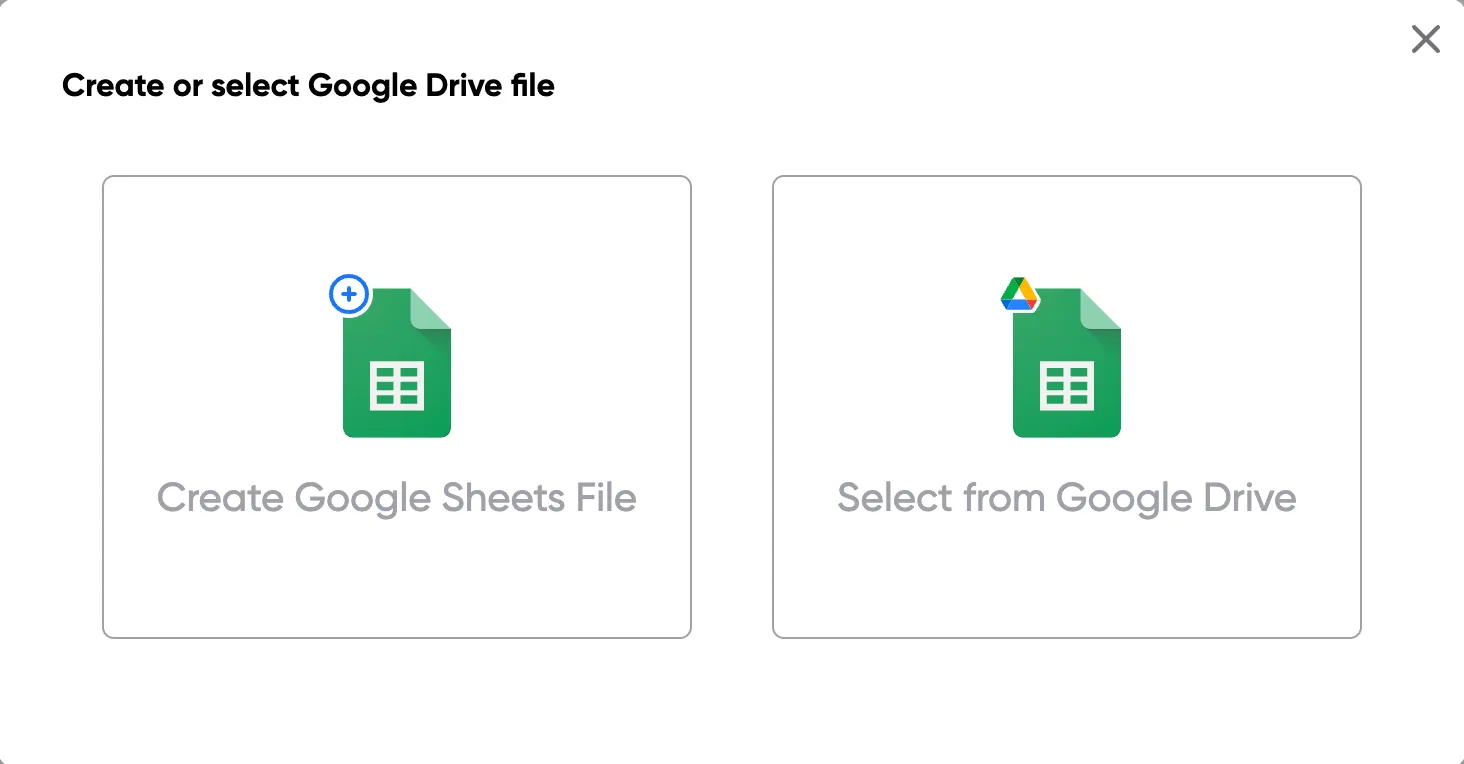
Step 1: Open a Google Sheet
Open a Google Sheet that contains the data for your quotes. This could include customer details, product names, quantities, pricing, and discount information. Create a new sheet if you don't have one yet.
Step 2
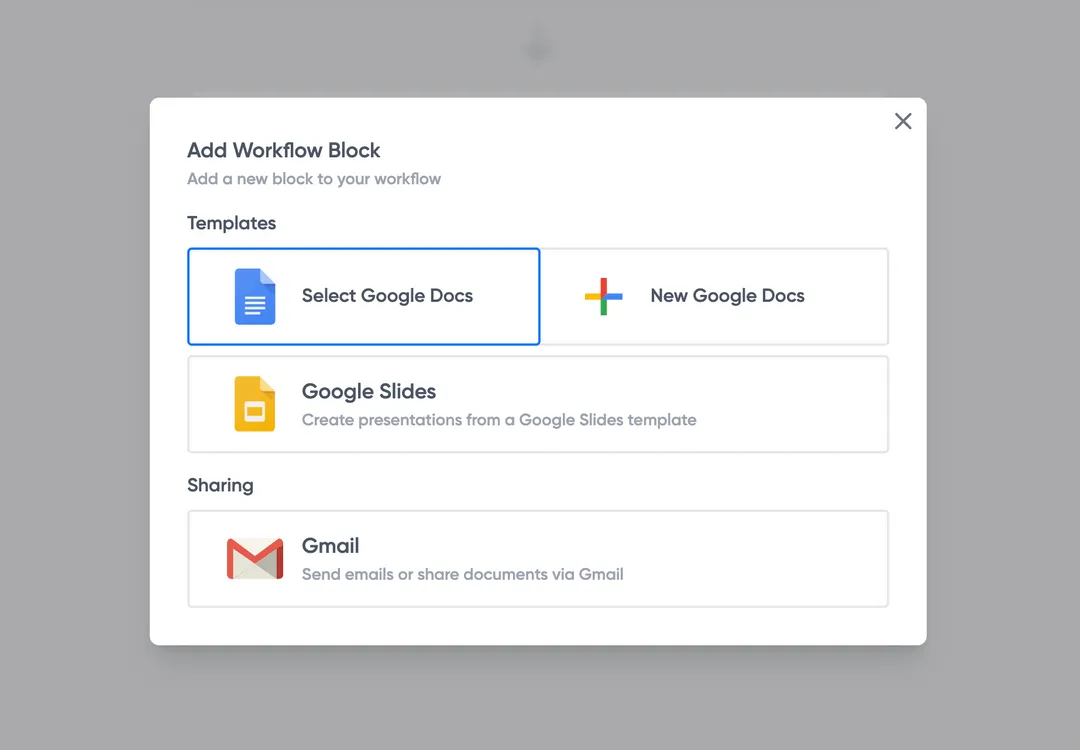
Step 2: Connect your quote template
Open the Portant add-on and connect your Google Docs or Slides quote template. Portant will scan for merge tags and match them to your sheet columns automatically.
Step 3
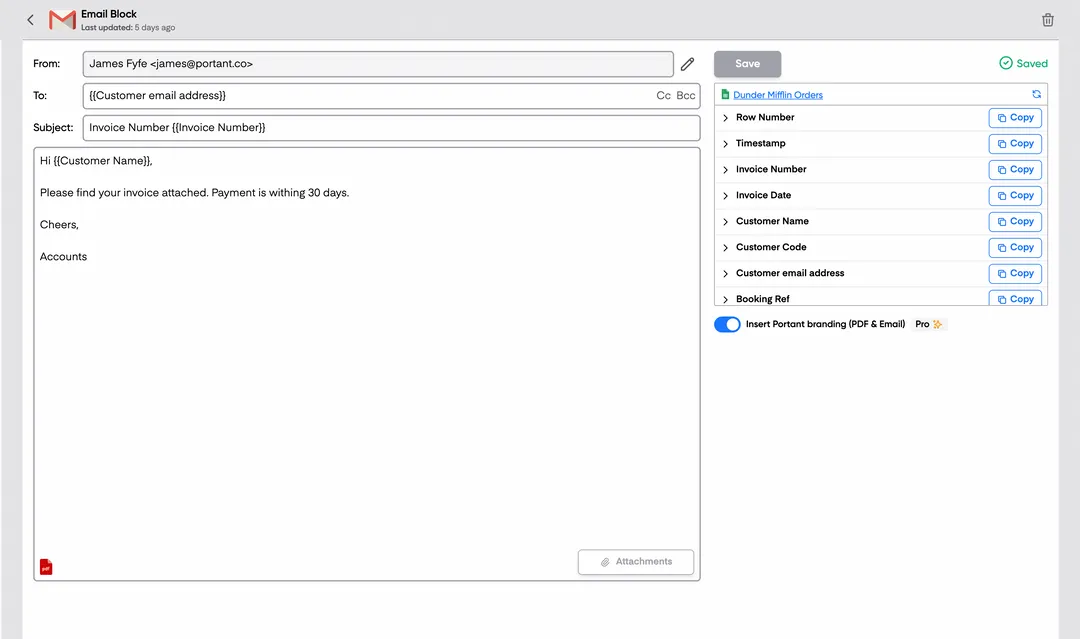
Step 3: Customize your output
Choose how your quotes are delivered. Send them directly to customers via email, save as PDFs to Google Drive, or both. Add merge tags to the email subject and body for a personal touch.
Step 4
Step 4: Automate your quotes
Turn on auto-create to generate quotes every time a new row is added. Run the workflow manually for batch processing, or schedule it to run at specific intervals.
Eliminate unnecessary manual work
Stop spending hours copying and pasting data from spreadsheets into documents. Portant automates the entire process, pulling data directly from your source and generating completed documents in seconds. Focus on the work that matters, not repetitive formatting tasks.
Make your documents more accurate
Manual document creation leads to errors, from wrong names to outdated figures. Portant maps data fields directly to your template, eliminating typos and ensuring every document is accurate and consistent. Your team sends fewer corrections and your clients get the right information every time.

Built into Google Workspace
Portant works natively with Google Docs, Sheets, Slides, and Gmail. There is no new interface to learn, no data to export, and no switching between tools. Your team stays in the apps they already use while Portant handles the document generation in the background.
What teams say about Portant
“Portant has been a game-changer for Clipboard! It's saved our sales team countless hours every week by generating order forms, proposals and contracts with info from HubSpot automatically filled in.”
“This product is a gamechanger for all of those painful manual document merges. Love what you and the team have built!”
“This software brilliantly takes over the tedious process of creating and sending invoices. This not only saves time but massively reduces errors of data entry.”
“Love this product. Have been using it for over a year and the integration to Google Workspace is awesome. Lots of credit for listening to your users!”
“Truly a gamechanger! Portant streamlines these tasks and allows me to focus on the things that require my attention and problem-solving!”
“Portant has been a game-changer for Clipboard! It's saved our sales team countless hours every week by generating order forms, proposals and contracts with info from HubSpot automatically filled in.”
“This product is a gamechanger for all of those painful manual document merges. Love what you and the team have built!”
“This software brilliantly takes over the tedious process of creating and sending invoices. This not only saves time but massively reduces errors of data entry.”
“Love this product. Have been using it for over a year and the integration to Google Workspace is awesome. Lots of credit for listening to your users!”
“Truly a gamechanger! Portant streamlines these tasks and allows me to focus on the things that require my attention and problem-solving!”
Frequently asked questions
A construction quote template is a preformatted document used to outline the costs associated with a construction project. It includes essential details like labor and material costs, equipment, and other relevant expenses. This template helps construction businesses and contractors provide clients with a detailed breakdown of costs, ensuring transparency. Free quotation templates can also be customized for specific projects, and companies can add their business logo and physical address for a more professional presentation. Accurate cost estimation is an essential part of ensuring clients receive clear information. Additionally, construction professionals benefit from this tool because it provides contact details and easy-to-understand pricing information. By using this template, a business can efficiently outline and manage various construction expenses and tasks.
A construction quote is a fixed price offer for the completion of a project, while a construction estimate is an approximate price that may change as the work progresses. Quotes are more precise, typically including a detailed breakdown of unit prices and materials. Once a quote is accepted, it becomes binding, and the contractor must complete the services as outlined. In contrast, an estimate leaves room for price fluctuations. A construction estimate often includes additional services that may not be present in the original scope. Contractors can also issue revised estimates if there are significant changes. Properly managing both quotes and estimates is crucial for construction professionals to maintain trust and clear communication with their clients.
A construction quote template should include key elements like the company name, a description of the work, a detailed price quote, payment terms, and space for signatures. Additionally, it’s important to outline labor costs, material costs, and any overhead to ensure the total price is clear and accurate. For specific services, contractors may also want to include project management fees, especially for large-scale construction projects. A well-constructed template is an essential part of creating a visually appealing quote that effectively communicates all necessary information to potential clients. Furthermore, adding essential details like contact information and using tools like microsoft word for formatting ensures a professional presentation.
Using a construction quote template offers several benefits. It ensures consistency and accuracy, reducing the risk of human error, particularly when dealing with labor costs, materials, and construction work. Additionally, businesses can save valuable time by automating the quoting process. The template allows for quick generation of professional quotes that potential customers can easily understand. This valuable tool also allows contractors to tailor quotes to specific services and adjust pricing according to the unique needs of each client. This business method ensures that every final quote is delivered efficiently, while providing potential clients with a reliable and transparent service.
Yes, a construction quote template is typically customizable. Contractors can modify the template to include project-specific details, such as unique material costs, labor needs, or special conditions related to the construction site. This flexibility is especially useful when dealing with varied projects. Additionally, contractors can update overhead costs and unit prices to reflect the scope of different services. Using a customizable template ensures that the final quote is tailored to each project, and contractors can quickly adjust the final total for different clients. Free quote templates also provide an easy way to manage multiple services by customizing key sections for each type of work.
Overhead costs, such as office expenses, rent, insurance, and other administrative costs, should be carefully factored into the construction quote. These expenses are often added as a percentage of the direct labor and material costs, or as a separate line item. Contractors need to ensure that overhead costs are accurately reflected in the final total, ensuring that the project is profitable. Including overhead costs as part of the overall quote is a crucial part of the pricing strategy. Moreover, offering discounts to clients who sign early or commit to larger projects may help justify the overhead. Adding additional services to the quote is another effective way to manage pricing, especially when overhead is significant.
After a construction quote is submitted, the client will review it and may either accept, reject, or request modifications. If accepted, the contractor will begin working on the project and draft a formal contract. The quote will then guide the overall pricing and timelines for the job site. It’s important to include any project management fees, especially if they weren’t detailed in the original quote. The contractor should also ensure that all services offered are clearly outlined to avoid any misunderstandings. Upon acceptance, the contractor can start managing the construction tasks while keeping track of expenses related to materials and labor costs.
Including an expiration date on a construction quote is crucial because it protects the contractor from fluctuations in material costs, changes in labor rates, or increases in overhead expenses. These expiration dates ensure that the quoted price remains valid for a limited time, reflecting the current market prices. Moreover, it provides an incentive for potential customers to make a quicker decision, ensuring that both parties understand the timeline for the proposed work. Contractors should ensure that the final quote includes this information to prevent misunderstandings and safeguard against unexpected price increases.
To create a construction quote, follow these steps:
- Select a Template: Choose a construction quote template that suits your needs, such as a construction quote template Word, Excel construction quote template, or free construction quote template download. Utilizing a construction quote template free can help standardize your quotes.
- Gather Details: Collect all necessary information including client details, project address, and contact information.
- Define the Project Scope: Clearly outline the scope of work, specifying tasks, materials, and services involved. This may include a sample construction quote, building quote template, or remodeling quote template.
- List Materials and Labor: Itemize all materials and labor, using a sample quotation for labor and materials or a material quote template. Specify quantities, units, and costs.
- Include Timelines: Provide an estimated timeline for the project completion, detailing phases if necessary.
- Add Terms and Conditions: Clearly state payment terms, warranty, and conditions of the construction work. A construction company quotation format can help ensure all necessary details are included.
- Calculate Total Cost: Sum all costs to provide a total project price. Be transparent about taxes, fees, and additional charges using a construction quotation sample format or professional construction quote template.
- Review and Adjust: Check for accuracy and completeness. A review can help verify the quote meets the client’s requirements and your business standards.
- Present the Quote: Deliver the finalized quote to the client in their preferred format, whether it's an online construction quote, PDF, or printed form. Using a contractors quote template free or online quote forms may speed up the process.
- Follow Up: After sending the quote, be available to discuss and refine any aspects with the client to secure approval.
These steps will guide you in preparing a comprehensive and professional construction quote tailored to your client's needs.
If you reach the document limits, you’ll still be able to use your invoicing workflows. They will notify you about the overage and give you a grace period to find a template that fits your needs!
Yes, there is a quote template available in Word, which can be particularly handy for contractors and freelancers who need to prepare professional quotes for their clients. Here are some ways to find and use quote templates in Word:
1. Built-in Templates:
- Open Microsoft Word.
- Click on ‘File,’ then select ‘New.’
- Use the search bar to type “quote” or “quotation template.”
- Browse through the available templates and select the one that best fits your needs.
2. Online Resources:
- Microsoft Office’s website offers a variety of templates, including contractor and freelance quote templates, which can be downloaded for free and used in Word.
- Other websites may also offer free downloadable Word templates for specific needs, such as construction quotes, remodeling quotes, and job quotes.
3. Customization:
- Once you’ve downloaded a template, you can customize it by adding your company’s logo, adjusting the layout to include necessary fields such as client information, detailed descriptions of goods or services, pricing, and terms and conditions.
- Save your customized template for future use to ensure consistency across all quotes.
4. Using a Template for Specific Industries:
- For construction companies, there are templates such as construction quote forms or construction job quote templates that are specially formatted to include fields relevant to construction projects.
- Freelancers can use templates like freelance quote templates or freelance project quotation templates tailored for project-based work.
5. Available Formats:
- If you are looking for a specific format like a Word template, you can search for "contractor quote template Word" to find options that are in the Word format, ready to be downloaded and edited.
These resources should help you prepare professional quotes efficiently, saving time and ensuring you present a polished image to your clients.
To construct a quotation for construction work effectively, consider the following steps:
1. Header Information:
- Include your construction company's name, address, contact details, and logo if applicable.
2. Client Details:
- Clearly state the client's name, address, and contact information.
3. Quote Title and Number:
- Use a descriptive title such as "Construction Quote" followed by a unique reference number for tracking.
4. Date:
- Specify the date the quote is issued.
5. Scope of Work:
- Outline the details of the project, including all tasks, services, or materials involved. Be specific to avoid misunderstandings.
6. Itemized Breakdown:
- List each element of the project with detailed descriptions. Include:
- Labor costs
- Materials costs
- Equipment costs
- Subcontractor charges
7. Pricing:
- Provide detailed pricing for each item and summarize the total cost.
- Highlight any taxes or additional fees.
8. Terms and Conditions:
- Clearly state the terms of payment, including deposit requirements, payment schedule, and methods of payment.
- Include clauses about project timelines, warranties, and any other relevant conditions.
9. Validity of the Quotation:
- Mention how long the quote is valid (e.g., 30 days) to ensure the client understands the time frame for acceptance.
10. Acceptance Section:
- Leave space for client signature and date signifying their acceptance of the terms and agreement to proceed with the quoted work.
11. Additional Information:
- Add any notes or disclaimers that could influence the project or quote, such as contingencies or exclusions.
12. Contact Information:
- Provide a point of contact for any queries or clarifications regarding the quote.
This structured approach ensures clarity and professionalism, helping clients understand the project scope and costs, ultimately aiding in the approval process.
Creating an estimate for a construction project involves several key steps, ensuring accuracy and comprehensiveness. Here’s how to construct a solid estimate using the concept of a construction quote template:
1. Define the Scope of Work: Start by clearly outlining the project's scope to determine the specific tasks, materials, and labor needed.
2. Gather Information:
- Site Details: Collect relevant information about the construction site, including measurements and any specific site conditions that might affect the project.
- Client Requirements: Understand the client's needs and any special requests that might impact costs or project execution.
3. Itemize the Costs:
- Materials: Break down all the required materials, including quantities and costs. It’s essential to account for potential fluctuations in material prices.
- Labor: Calculate the labor costs for each task involved. Consider using a contractor quote template to account for varied labor rates.
- Subcontractor Fees: If subcontractors are needed, include their fees in the estimate.
- Equipment and Tools: List any necessary equipment rentals or purchases.
4. Include Overhead and Profit: Add a percentage of the estimated costs to cover overhead expenses (like office expenses, insurance, and utilities) and desired profit margins.
5. Contingency Plan: Incorporate a contingency fund to cover unforeseen costs, usually around 5-10% of the total estimate.
6. Detailed Description: Use a construction quote template to provide a clear, itemized description of each cost category, contributing to transparency and understanding.
7. Review and Adjust:
- Double-check all calculations for accuracy.
- Compare the estimate with similar projects and historical data to ensure competitiveness and reasonableness.
8. Finalize the Estimate: Organize the information in a professional construction quote template, ensuring it’s visually clear and easily understandable.
9. Presentation: Craft the final document to align with a professional standard, possibly using word processing software or formats like an Excel construction quote template, to maintain a clean and organized layout.
10. Client Communication: Accompany the estimate with a brief explanation of critical budgetary items to foster trust and clarify any potential questions the client might have.
Employing these steps ensures that your construction quote template is comprehensive, competitive, and maintains a professional standard.
To build a construction cost estimate, follow these steps:
1. Define the Project Scope: Clearly outline the tasks, materials, and time required to complete the project. This includes defining the labor, materials, and equipment needed.
2. Gather Material Costs:
- Use a construction quotation template to get quotes from suppliers for required materials. Include all necessary materials such as lumber, concrete, and finishes.
- Consider any potential price changes due to market fluctuations.
3. Estimate Labor Costs:
- Use a contractor quote template to detail the labor involved, including hours for builders, subcontractors, and specialized workers.
- Factor in wages, benefits, and overtime costs.
4. Assess Equipment Needs:
- Identify necessary equipment and estimate rental or purchase costs using templates for quotes construction to ensure accuracy.
5. Include Permits and Fees:
- Research and include costs for necessary permits, inspections, and any legal fees associated with the project.
6. Evaluate Overhead Costs:
- Account for project management, utilities, insurance, and other indirect costs using a construction company quote template.
7. Calculate Contingency:
- Add a contingency percentage (typically 5-10%) to cover unforeseen expenses, using a construction estimate quote template.
8. Draft the Quote:
- Use a professional construction quote template to organize and present all cost elements logically and clearly.
- Include a detailed breakdown for transparency and accuracy.
9. Review and Finalize:
- Double-check calculations and ensure all aspects are covered. Consider using a construction quotation sample format for comparison.
10. Present the Estimate:
- Use clear and concise language in the completed construction quote form to present the estimate to stakeholders or clients.
Adopting these steps will ensure a comprehensive and accurate construction cost estimate.
1. Understand the Project Requirements:
- Conduct a detailed assessment of the project scope and requirements.
- Gather information on the materials, labor, and timelines involved.
2. Use a Construction Quote Template:
- Utilize a construction quote template or construction quotation template to ensure all essential details are covered.
- Include categories such as materials, labor, equipment, and any additional fees to provide a clear breakdown of costs.
3. Accurate Cost Estimation:
- Calculate costs accurately using current prices for materials and labor.
- For a construction quote or building quote, include a contingency plan for unforeseen expenses.
4. Format Professionally:
- Present the estimate in a professional format, using templates for quotes construction, to enhance credibility.
- Ensure the inclusion of company details, client information, project description, and a detailed cost breakdown.
5. Transparency and Clarity:
- Provide a transparent view of all charges; distinguish between fixed costs and estimated costs.
- For a construction project quotation sample, clearly specify terms and conditions including payment terms and deliverables.
6. Use Digital Tools:
- Leverage online construction quotes tools or software for ease and accuracy.
- For those seeking a digital approach, construction quote template word or excel construction quote template may be used.
7. Address Client Needs:
- Tailor the estimate or contractor quote template to meet the specific preferences and needs of the client.
- Ensure it aligns with the customer’s budget and expectations.
8. Include a Timeframe:
- Specify an estimated timeline for project completion in the construction quote template.
- Highlight any potential delays or influencing factors to set realistic expectations.
9. Offer Options:
- Provide different options or packages, such as builder quote template free options or more premium solutions, to match varying budgets.
10. Review and Revise:
- Encourage feedback on the quotation to make necessary adjustments.
- Make revisions where needed to improve accuracy and client satisfaction.
11. Follow Up:
- After delivering the estimate, follow up with the client to address any questions or concerns.
- Stay open for negotiations or clarifications to reinforce trust and ensure mutual understanding.
Approach each estimate with attention to detail and a commitment to customer service, ensuring clarity, accuracy, and professionalism in every aspect.
To write a simple estimate for a construction project, follow these steps:
- Gather Necessary Information: Collect all relevant details about the project, including the scope of work, materials needed, labor requirements, and any relevant timelines.
- Header: At the top of your document, include your company's name, address, contact information, and the date. Also, add the client's name and contact details.
- Project Description: Provide a brief description of the project. Include details such as the location, unique features, and any specific client requests.
- Itemized List: Create an itemized list of all tasks and materials required for the project. For each item, provide:
- Description
- Quantity
- Cost per unit
- Total cost
- Labor Costs: Estimate the labor costs by calculating the number of hours required for the project and multiplying by the hourly rates of the workers.
- Taxes and Additional Fees: Include any taxes, permits, or additional fees that may apply.
- Subtotal and Total: Add up all the costs in your estimate to provide a subtotal. Then, apply any applicable taxes or fees to arrive at the total estimated cost.
- Payment Terms: Clearly outline the payment terms, including any deposit required, payment schedule, and accepted payment methods.
- Notes and Conditions: Include any additional notes or conditions relevant to the project, such as warranties, exclusions, or specific terms of service.
- Signature Line: Provide space for both parties to sign and date the estimate to indicate acceptance.
Use a clean and professional layout, consider using software like Excel or Word to create a construction quote template for consistent use across projects.
To estimate a project correctly, especially in construction, follow these steps:
- Define the Scope of Work: Clearly outline what the project entails. A detailed construction work quote template can help in listing all activities and tasks required.
- Gather Detailed Requirements: Consult with stakeholders to understand the specific needs and expectations. Use a construction quotation template or a building quote template to ensure all facets are covered.
- Conduct a Site Assessment: Visit the project site to evaluate conditions that might affect the project. Use a construction quote form or sample to record necessary observations.
- Break Down the Project into Tasks: Create a detailed list of tasks using a construction quote sheet. This helps to allocate resources efficiently.
- Estimate Labor and Material Costs: Use a sample quotation for labor and materials to estimate costs accurately. A construction job quote template can assist in listing labor requirements effectively.
- Include Equipment and Overhead Costs: Don't forget to factor in equipment rentals or purchases, and overhead costs. A contractor quote template or a construction company quotation format can help in structuring these costs.
- Consider Contingencies and Risk Factors: Allow for unexpected expenses by including contingencies. A professional construction quote template might include standard contingency fields to ensure coverage.
- Total the Costs: Use all compiled data to calculate the total project estimate. A construction quotation template in word or excel can help automate this process for accuracy.
- Review Legal Requirements: Ensure your estimate is compliant with local regulations and standards. This might be included in your quotation template for construction work.
- Get Feedback and Revise: Share the estimate with team members or stakeholders for feedback, and adjust as necessary. Template updates can be tracked using a free contractor quote template for clarity.
- Finalize and Communicate: Once all revisions are made, finalize your quote with a construction quote template free download option for easy distribution to clients or stakeholders.
By following these steps and utilizing the appropriate construction quotation samples and formatting tools, you can ensure a comprehensive and accurate project estimate.
The estimate for a construction project is typically prepared by the contractor or a dedicated estimator within a construction company. In some cases, a general contractor or a builder will develop the initial quotes using construction quote templates or forms. The process often involves:
- Assessing the project requirements and scope.
- Reviewing architectural drawings and specifications.
- Calculating labor costs based on workforce requirements and durations.
- Estimating material costs by considering required quantities and supplier prices.
- Considering potential subcontractor quotes.
- Utilizing estimating software or quote templates (such as Excel construction quote templates) to organize the data.
- Applying profit margins and contingencies as necessary.
Professional estimators or contractors may use tools like a construction job quote template or builder quote templates to streamline the quote preparation process. These templates help ensure accuracy and consistency in construction quotes.
Explore related templates
Design Quote Template
Copy our Design Quote Template, automate your quotes process, and create professional quotes using customizable templates.
View template Quote templatePrice Quote Template
Copy our Price Quote Template, automate your quotes with customizable templates like a service or business quote template, and create professional, accurate quotes quickly.
View template Quote templateQuote Invoice Template
Copy our Quote Invoice Template, automate your quoting process, and create professional quotes with customizable templates, including options for pricing, business logos, and service details.
View template Quote templateWord Quote Template
Connect your Word to a customizable quote template to streamline your quotation process, easily add client details, unit prices, and service quotes, and generate professional quotes effortlessly.
View template Quote templateExcel Quote Template
Connect your Microsoft Excel to a customizable quote template or price quote template and streamline your sales quote or service quote process effortlessly for small businesses and specific clients.
View template Quote templateQuote template google docs
Use our Google Doc Quote Template to customize and streamline your process with accurate, professional price quotes.
View template Quote templateGoogle Sheets Quote Template
Connect Google Sheets to a customizable quotation template and streamline your price quote process, ensuring accurate costs and service details for clients.
View template Quote templateSales Quote Template
Copy our Sales Quote Template, automate your quotes process, and create professional quotes using customizable templates.
View template Quote templateIndependent Contractor Quote Template
Download our Independent Contractor Quote Template to streamline your invoicing process. Create professional quotes, add material costs and labor costs, and ensure accuracy with every quote total.
View template Quote templateRental Quote Template
Copy our customizable rental quotation template to streamline your billing process, track rent payments, and automate your rental quotations for your rental business. Easily manage vehicle rentals, lease rental quotations, and more with our professional template.
View template Quote templateProforma Quote Template
Copy our Proforma Quote Template to create professional quotations easily. Automate your quote process using Google Sheets or Google Docs for a streamlined, customizable experience.
View template Quote templateBusiness Quote Template
Copy our free business quote template and easily automate your quoting process. Customize your professional quotes in pdf format using google sheets or excel templates, and streamline your workflow for faster, more accurate price quotes.
View template