
Invoice template
Rental Invoice Template
Copy our customizable Rental Invoice Template to streamline your billing process, track rent payments, and automate your invoicing for rental business.
Trusted by teams at










Rental Invoice Template
You can create rental property invoices automatically from Google Sheets in a few easy steps. It is simple to use Portant as a free rental invoice template which contains all kinds of different elements including your logo, unique invoice numbers, payment terms, and contact information. After you've opened Portant Workflow, select your Google Sheet, then connect a Google Docs invoice template, customise your blank invoice template with column tags, attach it to an email, and finally click 'Start automation', and voila!, you’ve automated your invoicing from Google Sheets!
We know how painful and monotonous it can be to double check and paste invoice data into invoice templates, save it as a pdf, and then send the custom rental invoice to your customers. That’s why we’ve come to the rescue.
With Portant, you can connect a Google Sheet to a rent invoice template, click a few buttons, and rental property invoices will be magically generated and sent whenever you need to. You can also customise the email and who it's sent from (e.g., accounts@portant.co). It's easy to place your invoicing on autopilot.
How to automate your rental invoices

Step 1
Open Sheet
Select the Google Sheet you want to use as the data source for your invoices. Portant connects directly to your spreadsheet to pull in the data it needs.

Step 2
Connect Template
Connect your Google Docs, Slides, or Sheets invoice template. Portant will link it to your spreadsheet data source so it knows which fields to merge.

Step 3
Customize
Customize your invoice with merge tags like {{Company Name}}, {{Amount Due}}, and {{Due Date}}. Format it with your branding, colours, and layout.

Step 4
Create
Create invoices automatically when new rows are added to your sheet, or generate them manually in batches. Send via email or save to Google Drive.
How to automate your rental invoices with a template
How it works
Step 1
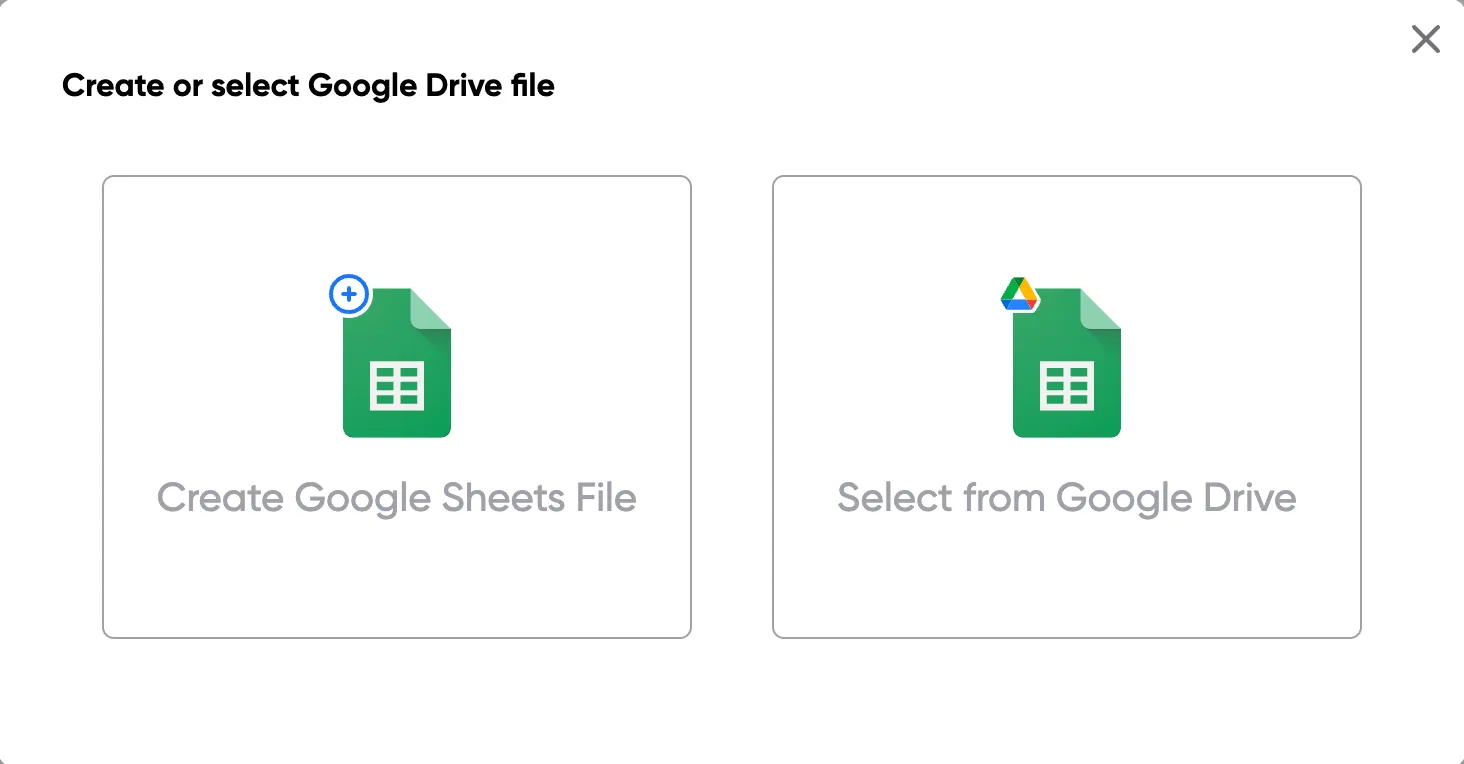
Step 1: Open a Google Sheet
Open a Google Sheet that contains the data for your invoices. This could be customer details, invoice numbers, amounts, and due dates. If you don't have one yet, create a new sheet and add your column headers.
Step 2
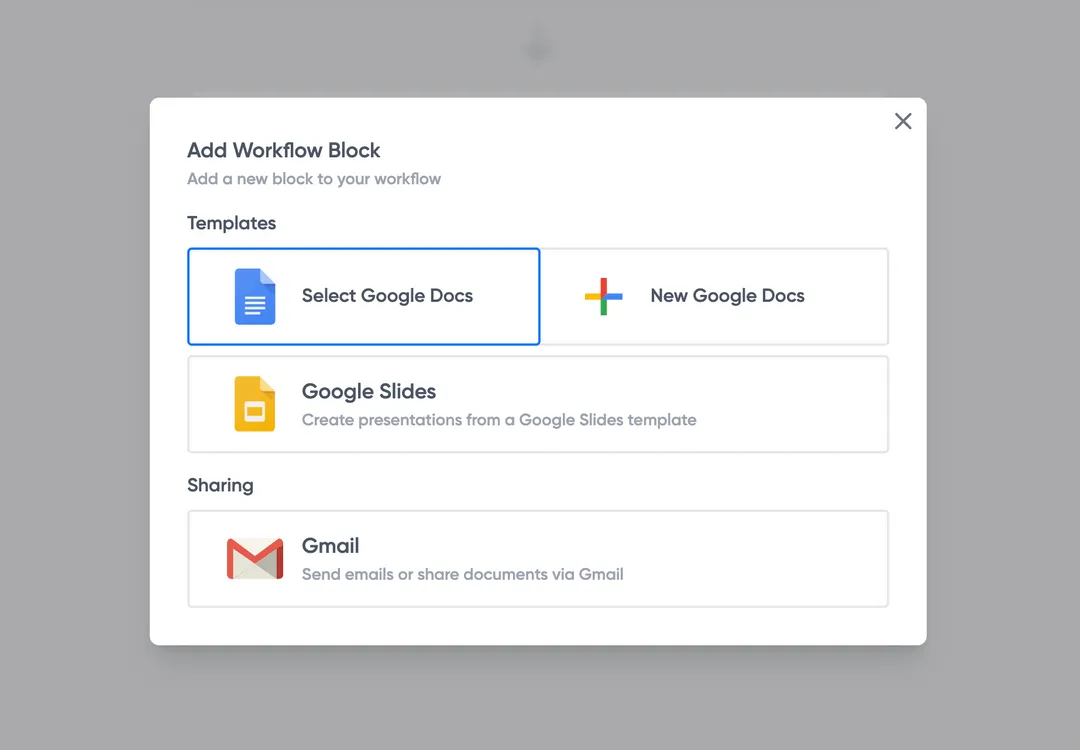
Step 2: Connect your invoice template
Open the Portant add-on from the Extensions menu and connect your Google Docs or Slides invoice template. Portant will scan the template for merge tags and map them to columns in your sheet.
Step 3
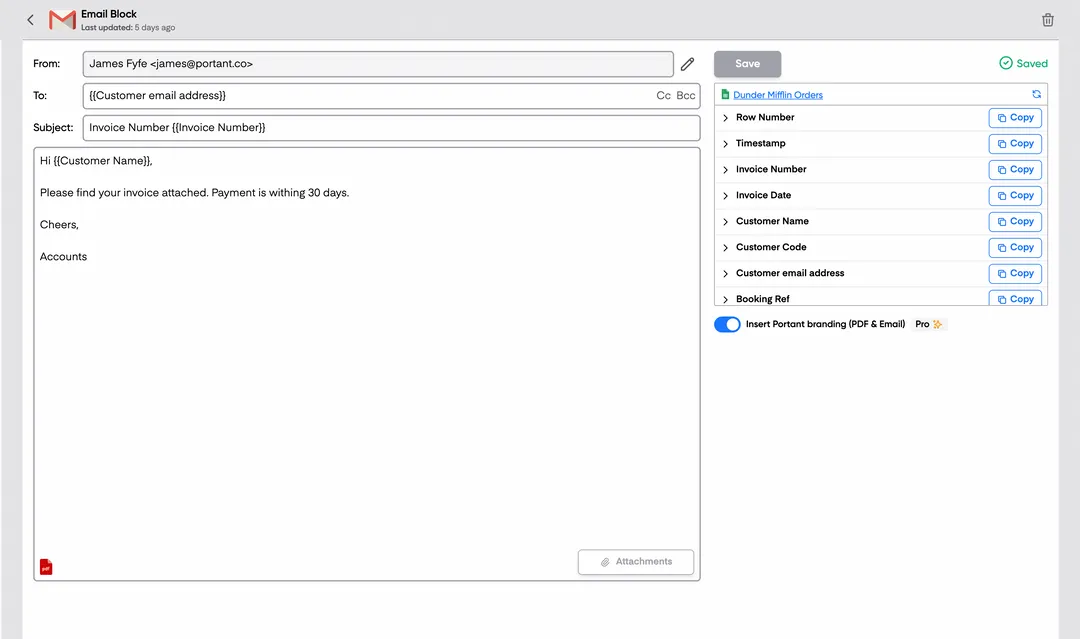
Step 3: Customize your output
Choose how you want your invoices to be delivered. You can email them directly to customers, save them as PDFs in Google Drive, or both. Customize the email subject and body with merge tags too.
Step 4
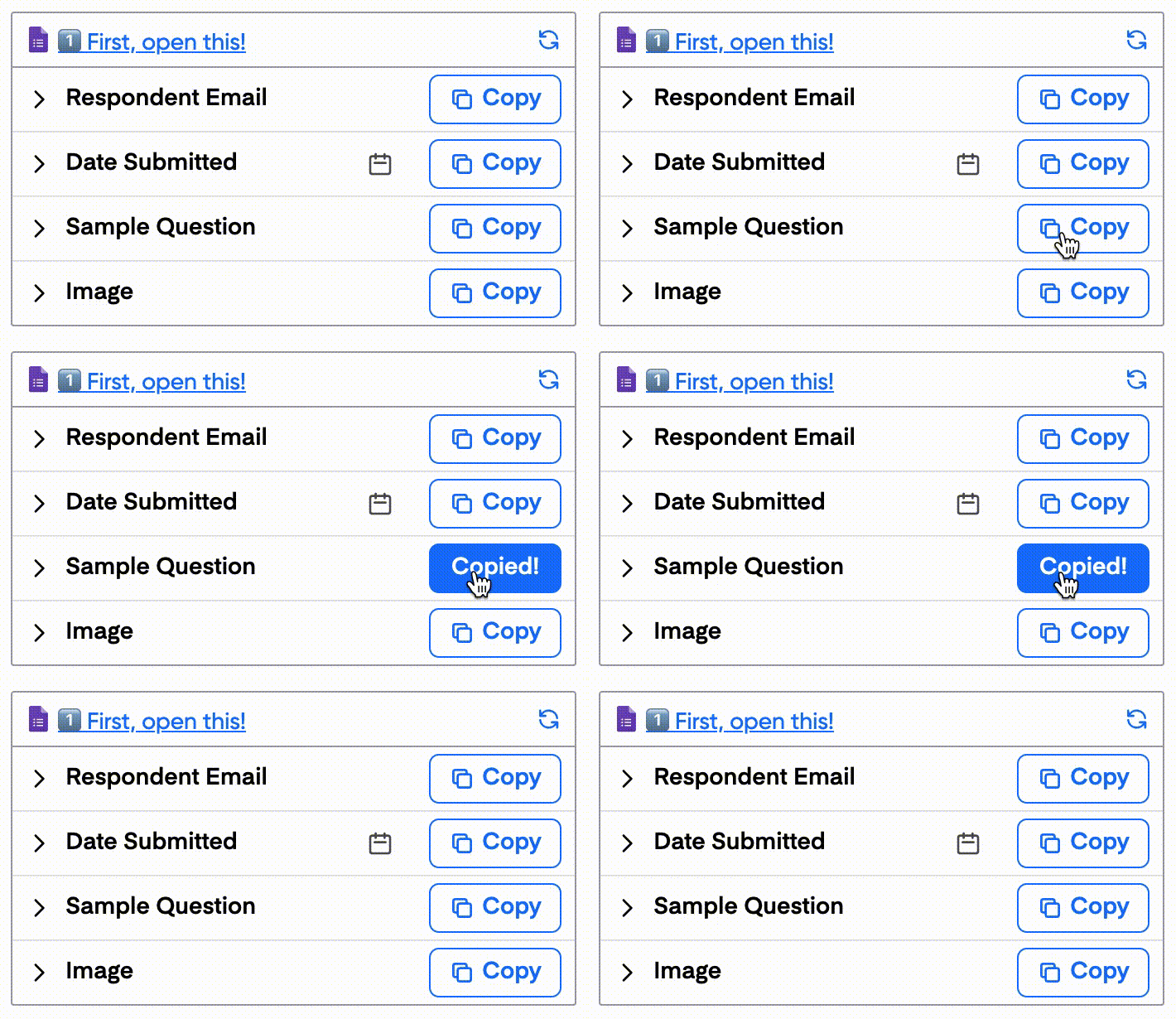
Step 4: Automate your invoices
Turn on auto-create to generate invoices every time a new row is added to your sheet. You can also run the workflow manually to process all rows at once, or schedule it to run at specific times.
Benefits
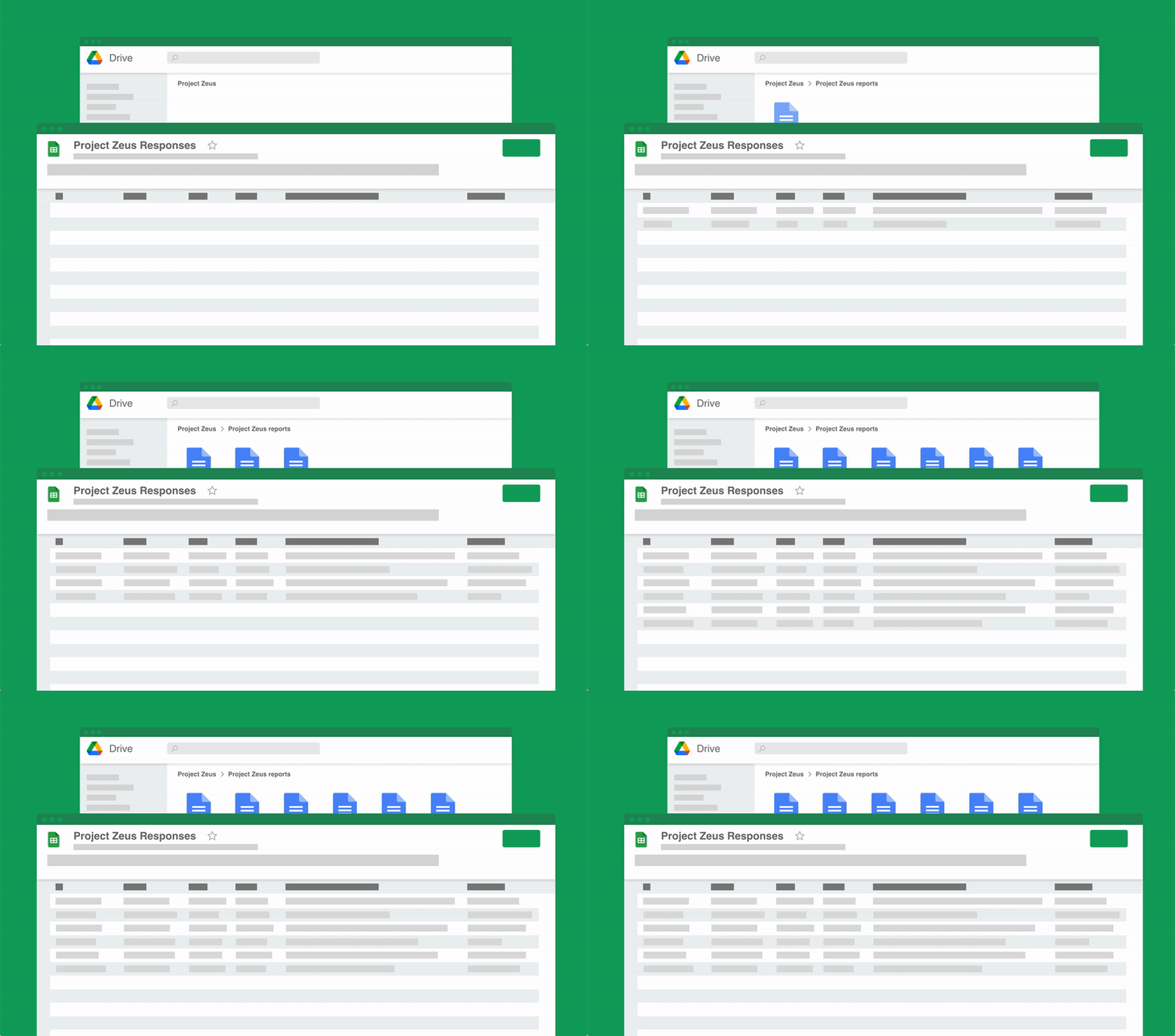
Eliminate unnecessary manual work
Stop spending hours copying and pasting data from spreadsheets into documents. Portant automates the entire process, pulling data directly from your source and generating completed documents in seconds. Focus on the work that matters, not repetitive formatting tasks.
Make your documents more accurate
Manual document creation leads to errors, from wrong names to outdated figures. Portant maps data fields directly to your template, eliminating typos and ensuring every document is accurate and consistent. Your team sends fewer corrections and your clients get the right information every time.
Built into Google Workspace
Portant works natively with Google Docs, Sheets, Slides, and Gmail. There is no new interface to learn, no data to export, and no switching between tools. Your team stays in the apps they already use while Portant handles the document generation in the background.
What teams say about Portant
“Portant has been a game-changer for Clipboard! It's saved our sales team countless hours every week by generating order forms, proposals and contracts with info from HubSpot automatically filled in.”
“This product is a gamechanger for all of those painful manual document merges. Love what you and the team have built!”
“This software brilliantly takes over the tedious process of creating and sending invoices. This not only saves time but massively reduces errors of data entry.”
“Love this product. Have been using it for over a year and the integration to Google Workspace is awesome. Lots of credit for listening to your users!”
“Truly a gamechanger! Portant streamlines these tasks and allows me to focus on the things that require my attention and problem-solving!”
“Portant has been a game-changer for Clipboard! It's saved our sales team countless hours every week by generating order forms, proposals and contracts with info from HubSpot automatically filled in.”
“This product is a gamechanger for all of those painful manual document merges. Love what you and the team have built!”
“This software brilliantly takes over the tedious process of creating and sending invoices. This not only saves time but massively reduces errors of data entry.”
“Love this product. Have been using it for over a year and the integration to Google Workspace is awesome. Lots of credit for listening to your users!”
“Truly a gamechanger! Portant streamlines these tasks and allows me to focus on the things that require my attention and problem-solving!”
Frequently asked questions
A rental invoice template is a structured document used by landlords and property managers to bill tenants for rent and related charges. It serves as a formal request for payment, detailing the amount due, accepted payment methods, and any additional fees, such as utilities or maintenance charges. A rent invoice template is customizable to suit different property types and rental agreements, ensuring consistency and professionalism in billing in any rental property. Landlords should create a rental invoice as it helps maintain detailed records and track payments, streamline the invoicing process, and reduce errors or misunderstandings with tenants.
Landlords should use rental invoice templates to streamline their billing process, enhance record-keeping, and ensure timely rental payments. Templates provide a standardized format that includes all necessary information, such as due date and payment terms, which helps avoid disputes. By using a consistent template, landlords can efficiently manage multiple rental properties and tenants, reducing time consuming administrative tasks and costs. Templates can also be customized to reflect the company branding and specific needs of the landlord, such as incorporating late fees or providing multiple payment options.
A comprehensive rental invoice should include the invoice number, date of issue, tenant's name, and contact information, along with the landlord's or property manager's details. The invoice should specify the property address and rental period, clearly stating the amount due and any additional charges like utilities or maintenance fees. Payment terms, including due dates and accepted payment methods, should be outlined to ensure clarity. Additionally, the invoice may include a breakdown of charges, applicable taxes, and notes regarding late payment penalties or discounts for early payment.
Customizing a rental invoice template involves tailoring the document to meet specific business needs and branding requirements. Start by adding your company logo and choosing colors that reflect your brand identity. Modify the template to include specific fields relevant to your rental agreements, such as unique charges, discounts, or rental payment terms applicable to certain tenants. Most templates are available in formats like Word, Excel, or PDF, making them easy to edit. Additionally, consider using software that allows for more advanced customization for your rent invoice, such as automating calculations or integrating with other property management tools.
Digital rental invoice templates offer numerous advantages, including easy accessibility and efficient record-keeping. They can be quickly edited and shared via email, reducing paper waste and speeding up the invoicing process. Digital templates often come with built-in features for automated calculations, which minimize human errors. Additionally, many digital templates integrate seamlessly with accounting or property management software, allowing landlords to track payments, manage multiple rental properties, and generate financial reports with ease.
Yes, rental invoice templates can be adapted for various property types, including residential, commercial, and vacation rentals. Each template can be customized to reflect the specific terms and conditions of different rental agreements. For example, a commercial property invoice might include charges for shared facilities or security services, while a short-term vacation rental might detail cleaning fees or seasonal rates. The flexibility of templates ensures that landlords can accurately and efficiently bill for any type of rental arrangement.
Rental invoices are typically sent monthly, aligning with the common practice of monthly rent payments. However, the frequency can vary depending on the rental agreement, such as weekly for short-term rentals or quarterly for certain commercial leases. It's essential to send invoices a few days before the payment due date to provide tenants with ample time to process the payment. Consistent billing cycles help reinforce payment habits and improve cash flow management for landlords.
Legal requirements for rental invoices vary by jurisdiction, but generally, they must accurately reflect the terms agreed upon in the rental contract. Invoices should include all pertinent information, such as the landlord's tax identification number, applicable taxes, and any legally required notices about late fees or penalties. It's crucial for landlords to familiarize themselves with local laws and regulations to ensure their invoices comply with legal standards, as this can prevent disputes and potential legal issues.
To create a rental invoice, consider the following steps and elements. Utilize relevant templates such as rental invoice template, rent invoice format, or rental invoice template download to streamline the process.
- Header Section:
- Include the word "Invoice" at the top of the document.
- Add your business or landlord name, address, and contact information.
- Tenant Details:
- Write the full name of the tenant(s) being billed.
- Include their contact information and rental property address.
- Invoice Details:
- Assign a unique invoice number for easy tracking and reference.
- Insert the date of the invoice and the due date for the payment.
- Rental Period:
- Clearly state the rental period the invoice covers (e.g., October 1 - October 31, 2023).
- Itemized Charges:
- List out items being charged, such as rent, utilities, and maintenance fees.
- Specify the amount for each item and any applicable taxes or late fees.
- Total Payment Due:
- Calculate the total amount due, which includes all itemized charges plus taxes and fees.
- Present the total prominently on the invoice.
- Payment Instructions:
- Provide clear instructions on how to make the payment, including accepted payment methods (bank transfer, check, online payment, etc.).
- Include any important details like bank account numbers or payment portals.
- Terms and Conditions:
- Highlight any terms and conditions related to the payment, such as penalties for late payments.
- Notes and Additional Information:
- Add any additional information relevant to this invoice or future payments.
- Use this section to thank the tenant and invite them to ask questions or raise concerns.
Using templates like rent invoice template free, rental property invoice template, or rental invoice template word can help fill in these details more efficiently and ensure completeness. Adjust the design or format according to your preferences, such as adapting templates for Excel (rent invoice format excel) or Word. For specific needs, explore variations such as short term rental invoice, landlord invoice template, or property management invoice template.
Yes, there is an invoice template available in Microsoft Word. Word provides a variety of customizable invoice templates, including those specifically for rental purposes. These templates are user-friendly and can be adjusted to fit specific needs, such as rental properties or landlord-tenant agreements. Here's how you can access and use a rental invoice template in Word:
1. Open Microsoft Word:
- Launch Microsoft Word on your computer.
2. Access Templates:
- Go to the search bar or the 'File' menu and select 'New.'
- Search for "invoice" to find a range of available templates.
3. Choose a Suitable Template:
- In the search results, you should see various templates, including options for a rental invoice.
- Look for terms like "rental invoice template Word," "house rental invoice template," or "landlord invoice template."
4. Customize the Template:
- Open your selected template.
- Edit the fields with your information such as the rental property address, tenant name, rental period, and payment details.
5. Save and Use:
- Save the customized invoice for your records or print it for physical copies.
These templates are ideal for landlords, property managers, or anyone who needs to generate a professional rental invoice quickly and efficiently. Additionally, if you need more specific designs or features, consider exploring third-party template providers or Word's online template resources.
A rent statement and a rent invoice serve distinct purposes in property management and rental transactions:
- Rent Invoice:
- A rent invoice is a formal document prepared by the landlord or property manager and issued to the tenant.
- It serves as a request for payment for rental services, detailing the amount due, the due date, and the period the invoice covers.
- It may include additional costs such as utilities, maintenance charges, or late fees if applicable.
- Rent invoices help formalize the payment process and provide documentation for both the tenant and landlord.
- Rent Statement:
- A rent statement is an account summary provided to tenants that outlines their payment history, including past payments made, payments due, and any outstanding balances.
- It usually covers a longer period than an invoice, allowing tenants to track their payment history over time.
- Rent statements typically include detailed information about any adjustments, credits, or additional charges applied to the tenant's account.
- They offer transparency and help tenants keep track of their financial obligations related to renting the property.
In summary, a rent invoice is primarily a request for payment, while a rent statement provides a comprehensive history of rental payments and account activity. Both documents play vital roles in maintaining clear communication and financial clarity between landlords and tenants.
An invoice for an apartment is a document issued by a landlord or property management company to a tenant, detailing the amount due for rent and any additional charges related to the apartment rental. This invoice serves as a formal request for payment and provides important information for both the tenant and landlord. Here are the key components typically included in an apartment rental invoice:
- Invoice Number: A unique identifier for tracking and reference purposes.
- Date: The date the invoice is issued.
- For Period: Specifies the rental period the invoice covers, such as the month and year.
- Tenant Information: The name and contact details of the tenant.
- Landlord Information: The name and contact details of the landlord or property management company.
- Property Address: The address of the apartment being rented.
- Description of Charges:
- Rent Charge: The base amount due for rent.
- Utilities/Additional Fees: Any additional charges for services like electricity, water, garbage, maintenance, or other agreed fees.
- Discounts/Adjustments: Any applicable discounts or adjustments that affect the total amount due.
- Total Amount Due: The total sum owed by the tenant.
- Payment Instructions: Details on how the tenant should make the payment, including acceptable payment methods and account details if applicable.
- Due Date: The deadline by which the payment must be received.
- Late Payment Terms: Information regarding any late fees or penalties if the payment is not made by the due date.
This invoice not only facilitates timely payment but also maintains a detailed record of rental transactions for both parties involved.
To write a simple invoice, follow these steps:
- Header:
- Include your business name or your full name if it's a personal invoice.
- Provide your address and contact information (phone number and email).
- Recipient Information:
- Add the client's name or business name.
- Include their address and contact details.
- Invoice Details:
- Assign a unique invoice number.
- State the date the invoice is issued.
- Include payment terms (e.g., "Due upon receipt" or "Net 30 days").
- Description of Goods/Services:
- List each item, service, or rental provided.
- For each entry, include a description, quantity, rate, and total amount.
- Subtotal:
- Sum up the line items to provide a subtotal before taxes.
- Taxes and Fees:
- Specify applicable taxes (e.g., sales tax) and any additional fees.
- Calculate the total tax amount.
- Total Amount Due:
- Add the subtotal and taxes to present the total invoice amount.
- Payment Instructions:
- Provide payment methods (e.g., bank transfer, check, online payment options).
- Include any relevant details like account numbers or payment portal links.
- Additional Notes:
- You may add extra information such as thank you messages or early payment incentives.
- Footer (Optional):
- Reiterate your contact information for any queries related to the invoice.
Ensure clarity and accuracy throughout the invoice to maintain professionalism and facilitate timely payment.
An invoice, particularly one for rentals such as a rental invoice template, rent invoice template, or landlord invoice template, must include specific legally required elements to be valid and enforceable. These elements ensure clarity and transparency for both parties involved. Here are the essential components that must be present on a rental invoice:
1. Invoice Title: Clearly label the document as an "Invoice". If it is a specific type of rental invoice, such as "House Rental Invoice" or "Commercial Rent Invoice", it should be specified.
2. Unique Invoice Number: Each invoice should have a unique identifier for record-keeping and reference purposes. This allows both parties to track and manage payments efficiently.
3. Date of Issue: The date the invoice is issued, which is crucial for determining payment deadlines.
4. Due Date: The date by which the payment should be made. This helps avoid any disputes regarding late payments.
5. Service Description: A detailed description of what the invoice covers. For rental invoices, this includes details like the property address, the rental period, and any specific terms related to the rental agreement.
6. Rent Amount: The total amount to be paid, specified in the agreed currency. If applicable, include a breakdown of the rent amount and any additional fees (e.g., utilities or maintenance).
7. Landlord's Details: The name, address, and contact information of the landlord or the property management company issuing the invoice.
8. Tenant's Details: The name and contact information of the tenant or the entity being billed.
9. Payment Terms: Specific terms related to the payment, such as accepted payment methods (e.g., bank transfer, check) and any late payment penalties or discounts for early payment.
10. Tax Information: If applicable, include tax details such as tax rate and total tax amount. This is particularly important for commercial rental invoices.
11. Bank Account Details: If payment is to be made via a bank transfer, include the landlord's banking information to facilitate the transaction.
12. Notes or Special Instructions: Any additional notes or instructions relevant to the rental agreement or payment process.
Including these elements on a rental invoice ensures that both parties have clear and comprehensive documentation of the rental agreement terms, payment expectations, and other relevant conditions. This is important for maintaining positive landlord-tenant relationships and adhering to legal standards.
Yes, you can send an invoice without a business. Individuals, such as landlords or freelancers, often need to send invoices even if they are not registered as a business. Here's how you can do it:
- Personal Details: Include your full name and contact information at the top of the invoice.
- Client Details: Provide the recipient's name and contact information.
- Invoice Number: Assign a unique invoice number for tracking purposes.
- Date: Clearly state the date when the invoice is being issued.
- Service Description: Detail the service provided or the rental period, including dates and any specifics relevant to the transaction.
- Amount Due: Specify the amount to be paid, ensuring clarity on the currency and any applicable taxes or fees.
- Payment Terms: Include payment terms, such as due dates and preferred methods of payment.
- Bank Details or Payment Instructions: Provide instructions for how the client can make a payment, such as bank details or online payment methods.
- Personalization: For added professionalism, consider using a simple template designed for individual use, such as a "rent invoice template" or a "rental invoice template."
- Signature: Optionally, include a place for your signature to authenticate the invoice.
Tools such as Microsoft Word, Excel, or Google Docs might offer free invoice templates that are suitable for personal use. Ensure your invoice is clearly structured and contains all necessary information to facilitate prompt payment.
A basic invoice should include the following essential components:
- Header:
- Title: Clearly label the document as an "Invoice."
- Company Name and Logo: Your business name and logo for brand recognition.
- Invoice Number:
- A unique and sequential number for tracking and reference.
- Date Information:
- Invoice Date: The issuing date of the invoice.
- Due Date: The payment deadline to ensure timely receipt.
- Seller Details:
- Name: Your business or personal name.
- Address: Your business or mailing address.
- Contact Information: Phone number and email address for communication.
- Tax Identification Number (if applicable).
- Buyer Details:
- Name: The name of the client or customer.
- Address: Client's billing or business address.
- Contact Information: Client's phone number and email address.
- Description of Goods/Services:
- List of Products/Services: Clear descriptions of what was sold or rented.
- Quantity: Number of units or the scope of service provided.
- Rate/Price: Cost per unit or service rate.
- Total Amount:
- Subtotal: Total cost before taxes and additional charges.
- Taxes: Applicable taxes based on jurisdiction.
- Discounts: Any discounts offered.
- Grand Total: The final amount due after all adjustments.
- Payment Terms and Methods:
- Payment Methods Accepted: Options such as bank transfer, credit card, or online payment gateways.
- Late Payment Fees: Penalty details for overdue payments, if applicable.
- Additional Notes:
- Special Instructions: Any relevant information, terms, or conditions not covered elsewhere, such as warranty details or contractual reminders.
- Footer:
- Thank You Note: A brief appreciation message to the client.
- Company Slogan or Message: An optional branding element to reinforce the company image.
An invoice and a receipt are both important financial documents used in transactions, but they serve different purposes and are typically used at different stages of the billing process.
Invoice:
- An invoice is a document sent by the seller to the buyer post delivery of goods or services. It serves as a formal request for payment.
- Contains details like the description of goods or services provided, the quantity, the agreed-upon prices, payment terms, due date, invoice number, and seller's contact information.
- It acts as a record of the transaction and informs the buyer of the amount due.
- In rental scenarios, an invoice can be used to request the payment for property rental, such as when using a rental invoice template, rent invoice format, or a landlord invoice template.
Receipt:
- A receipt is a document issued by the seller to the buyer after payment has been made.
- It acknowledges that payment has been received from the buyer.
- Includes details such as the date of payment, amount paid, method of payment, receipt number, and a brief description of the transaction.
- Acts as proof of payment and can be useful for record-keeping and tax purposes.
- In the context of rental payments, a receipt serves as confirmation that the tenant has paid the rent as invoiced.
Overall, an invoice is issued prior to receiving payment, seeking payment for services rendered or products sold, while a receipt is provided after payment is completed, confirming the transaction.
Yes, you can issue an invoice after a payment has been made. Here’s how you can approach it:
- Label the Invoice Appropriately: Clearly indicate on the invoice that it is a "Receipt" or "Paid Invoice" to distinguish it from an outstanding invoice.
- Include Key Details:
- Your business information: Include your name, address, and contact details.
- The recipient’s details: Include the tenant's or client's name and address.
- Invoice number: Assign a unique number to this invoice for tracking purposes.
- Date of payment: Specify when the payment was received.
- Description of goods/services: Provide a detailed description of what the payment was for, e.g., rent for a specific month.
- Amount paid: Clearly state the amount that has been paid.
- Payment method: Indicate how the payment was received (e.g., bank transfer, check, cash).
- Balance due: If applicable, include any remaining balance or note that the balance is $0 if fully paid.
- Use Templates: Consider using a rental invoice template or a rent invoice template to ensure all necessary information is included. Templates for a property rental invoice or a landlord invoice to tenant template can be customized for your needs.
- Utilize Software Tools: Rental invoice software or a rent invoice generator can streamline the creation of invoices and ensure accuracy.
- Additional Notes:
- Mention any transaction IDs or reference numbers for easier tracking.
- If the payment is for ongoing services, such as regular rent, note the period covered by this payment.
- Keep a copy of the invoice for your records and send a copy to your client or tenant for their records.
Issuing such an invoice after a payment ensures both parties have a clear record of the transaction, which can be helpful for bookkeeping and future reference.
Explore related templates
Proforma Invoice Template
Copy our Proforma Invoice Template, and automate your invoice process.
View template Invoice templateSales Invoice Template
Copy our Sales Invoice Template, automate your invoice process, and create professional invoices using customizable invoice templates.
View template Invoice templateIndependent Contractor Invoice Template
Download our Independent Contractor Invoice Template to streamline your invoicing process. Customize, save time, and ensure accurate payment terms.
View template Invoice templateBusiness Invoice Template
Copy our Business Invoice Template, and automate your invoice process.
View template Invoice templateCommercial Invoice Template
Copy our Commercial Invoice Template and automate your invoice process for accurate commercial value.
View template Invoice templateConsulting Invoice Template
Copy our Consulting Invoice Template and automate your consulting business invoice process with ease.
View template Invoice templateService Invoice Template
Copy our Service Invoice Template, and automate your invoice process.
View template Invoice templateFreelance Invoice Template
Copy our Freelance Invoice Template, customize it for your self employed business, and automate your sales invoice template process.
View template Invoice templateContractor Invoice Template
Copy our Contractor Invoice Template, and automate your invoice process.
View template Invoice templateConstruction Invoice Template
Use our Construction Invoice Template as a versatile contractor invoice template or construction invoice form.
View template Invoice templateGoogle Sheets Invoice Template
Connect your Google Sheet to a customizable invoice template and streamline your invoicing process effortlessly.
View template