
In June 2026, HubSpot launched Revenue Hub, its native quote-to-cash platform. For HubSpot teams it is a genuinely good release, and it also changes the question every sales operation should be asking: which parts of quote-to-cash do you run inside Revenue Hub, and which do you keep simple?
HubSpot Revenue Hub is HubSpot's native quote-to-cash platform. It brings configure-price-quote (CPQ), billing, and payments together with a contracts object, so a deal can move from quote to collected payment inside HubSpot. It is the evolution of Commerce Hub. Its standout is the interactive, modular quote: it is built around that document, not around the scopes of work and other paperwork that surround a deal.
This guide covers what Revenue Hub does well, where its scope ends by design, when the investment is worth it, and how to handle the documents it leaves to you.
What is HubSpot Revenue Hub?
Revenue Hub is the renamed and expanded version of Commerce Hub. HubSpot built toward it for years: Payments arrived first, billing followed, CPQ came next, and Revenue Hub ties them together with a contracts object that records what was sold.
The result is four connected parts inside HubSpot:
- CPQ for building and approving quotes from your product catalog.
- Billing for invoicing on the terms in the quote.
- Payments for collecting and reconciling.
- Contracts as the object that links the quote, the bill, and the payment to one deal.
Because every part reads from the same HubSpot deal, the data carries through without re-entry. That is the case for buying into one connected system instead of stitching three.
What Revenue Hub does well: the interactive quote
The interactive quote is the best thing in Revenue Hub. Instead of a flat PDF, the buyer gets a modular document where optional line items, quantities, and packages can be toggled, and the total updates live. For teams selling configurable products or tiered packages, that is a real upgrade over a static quote.
It is fast for the rep too. The quote pulls from the product catalog and the deal, approvals route inside HubSpot, and the accepted quote feeds straight into billing and payment. If your sales motion lives and dies on the quote document, Revenue Hub does that job well, and it does it natively.
So the first rule is simple: if the configurable quote is central to how you sell, use Revenue Hub for it. It is a strong, purpose-built tool for that exact job.
Where Revenue Hub's scope ends, by design
Revenue Hub is focused. It is built around the quote and the money that follows it. It does not set out to generate the other documents that wrap around a deal, and that is a deliberate product choice, not a gap waiting to be filled.
Those other documents are not edge cases. A typical B2B deal also needs some of:
- A scope of work or statement of work that defines what gets delivered.
- An onboarding brief or kickoff document for the delivery team.
- An order confirmation or order form tied to the signed deal.
- A project spec, an MSA, or a renewal summary.
These all draw on the same HubSpot deal data as the quote, but Revenue Hub does not produce them. If you stop at the quote, your team is back to copy-pasting deal details into a Google Doc for everything that comes after it. That is the manual work quote-to-cash is supposed to remove.

When is Revenue Hub worth it?
Revenue Hub is a premium, per-seat add-on, so it is a real investment on top of Sales Hub rather than a free upgrade. That makes the decision a question of fit, not just features.
Revenue Hub earns its place when:
- Configurable or tiered pricing is core to your deals, and the interactive quote changes how buyers choose.
- You want billing and payment collection to live natively in HubSpot, not in a separate finance tool.
- You have the deal volume and per-seat budget to justify a connected CPQ-to-payment system.
It is harder to justify when your pricing is straightforward, your quote is a clean itemized document rather than a configurator, or you mostly need the documents that come after the quote. In those cases you are paying per seat for a CPQ engine you will lightly use.
When Sales Hub plus Portant is enough
Plenty of teams do not need a configurator. They need to get an accurate quote out fast, sign it, invoice it, and produce the scope of work and onboarding documents around it, all from data that already lives in HubSpot.
For that, Sales Hub plus a document automation layer covers the document-heavy part of quote-to-cash without the Revenue Hub line item. Here is how the pieces fit:
- Sales Hub holds the deal, pipeline stages, line items, and contacts. The source of truth for everything downstream.
- Portant merges that deal data into branded Google Docs or Slides templates to generate quotes, contracts, invoices, and scopes of work, routes them for approval and signature, and files the finished PDF back to the deal.
- A payment processor (Stripe, or HubSpot Payments) collects once the invoice is issued.
The advantage is simplicity. Portant works with the Google Docs templates your team already knows, so there is no proprietary editor to learn and no per-seat CPQ cost to carry. You can read the full setup in the HubSpot quote automation playbook and the step-by-step guide to automating quotes and proposals in HubSpot.
Using Portant alongside Revenue Hub for everything else
The two are not an either-or. If you adopt Revenue Hub for the quote, billing, and payments, you still need the documents it does not produce, and that is where Portant fits next to it rather than against it.
Run the configurable quote, billing, and payment collection in Revenue Hub. Then use Portant to generate the scope of work, the onboarding brief, the order confirmation, and the project spec from the same HubSpot deal. Because Portant reads HubSpot deal, company, contact, and line item data directly, those documents stay consistent with the quote the buyer accepted, with no re-entry.
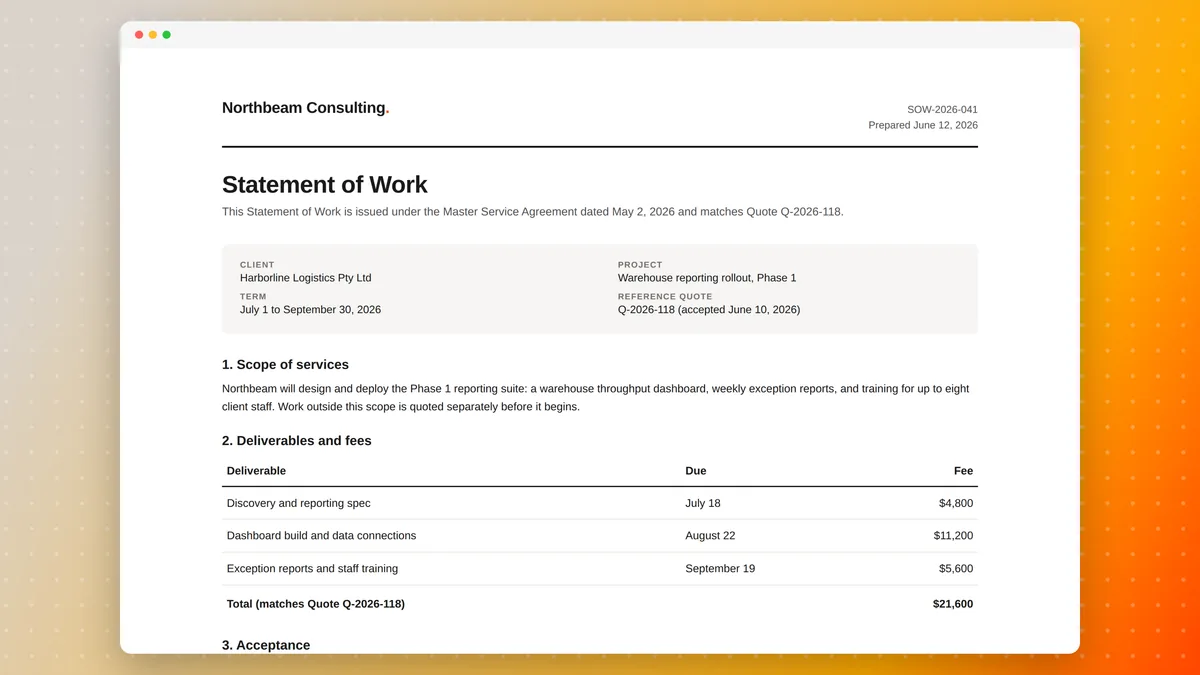
That keeps each tool on the job it is best at: Revenue Hub on the quote-to-payment spine, Portant on the documents that surround it.
Quote-to-cash with HubSpot, end to end
Quote-to-cash (Q2C) is the end-to-end process from the moment a buyer asks for a price to the moment you collect payment: pricing, quoting, contracting, order processing, invoicing, and payment collection. Whichever setup you choose, the same six stages have to happen. The difference is which tool owns each one.
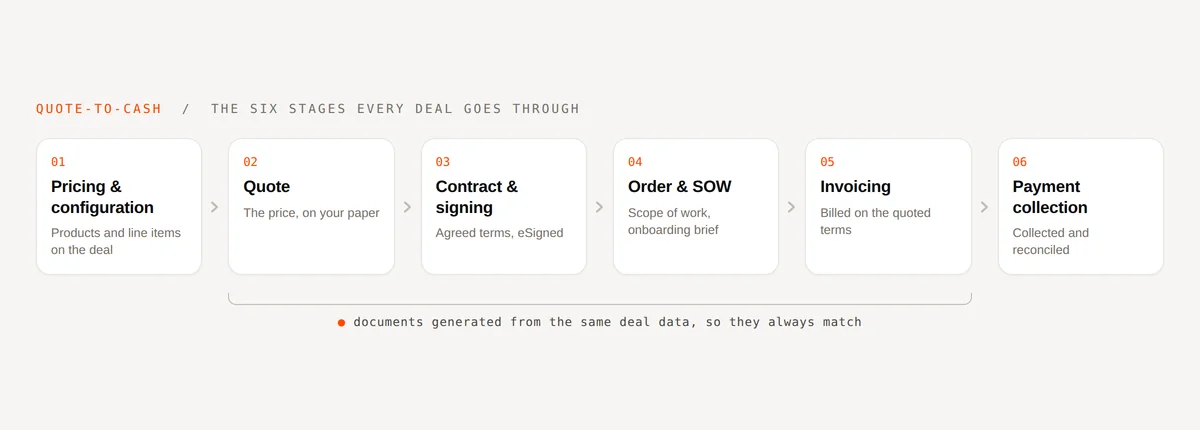
| Quote-to-cash stage | Revenue Hub | Sales Hub plus Portant |
|---|---|---|
| Pricing and configuration | CPQ from the product catalog | HubSpot products and deal line items |
| Quote | Interactive, modular quote | Branded quote from a Google Docs template |
| Contract and signing | Contracts object, native eSignature | Generated contract plus eSignature |
| Order processing and SOW | Not covered, pair with Portant | Scope of work and onboarding brief from the deal |
| Invoicing | Native billing | Generated invoice from the deal |
| Payment collection | Native payments | Stripe or HubSpot Payments |
The stall points are the same in both columns, and they are rarely the buyer. Pricing that lives in a spreadsheet outside the CRM, documents built by hand, and approvals that run on email chains cost more total cycle time than buyer review usually does. The fix is to keep pricing in HubSpot, generate documents from deal data instead of retyping it, and route approvals through a workflow with clear owners. A document approval workflow turns days of waiting into minutes, and automating the contract and the invoice from the same deal data removes the copy-paste step that introduces errors.
Whether the spine is Revenue Hub or Sales Hub, the documents around the deal still need to come from the same source. The statement of work is the clearest example: it has to match the quote exactly, and the reliable way to do that is to generate it from the deal, not to rewrite it.
Frequently asked questions
What is HubSpot Revenue Hub?
HubSpot Revenue Hub is HubSpot's native quote-to-cash platform. It brings configure-price-quote (CPQ), billing, and payments together with a contracts object, so a deal can move from quote to collected payment inside HubSpot. It is the evolution of HubSpot Commerce Hub.
Is Revenue Hub the same as Commerce Hub?
Revenue Hub is the renamed and expanded version of Commerce Hub. It keeps the payments and billing foundation Commerce Hub built and adds CPQ and a contracts object, so quoting, billing, and payment collection sit in one connected system.
How much does HubSpot Revenue Hub cost?
Revenue Hub is a premium, per-seat add-on, priced on top of your Sales Hub subscription, with the CPQ features sold per seat. HubSpot's pricing page has the current per-seat rates and the latest on billing pricing, so check there for exact figures before you budget.
Do I need HubSpot Revenue Hub?
You need it when configurable pricing, native billing, and payment collection inside HubSpot are core to how you sell. Many smaller teams with straightforward pricing run quote-to-cash on Sales Hub plus a document automation layer instead, and skip the per-seat cost.
What documents does Revenue Hub not generate?
Revenue Hub is built around the quote. It does not aim to produce the documents that surround a deal, such as scopes of work, onboarding briefs, order confirmations, and project specs. Teams generate those from HubSpot deal data with a document automation tool like Portant.
Can I run quote-to-cash without Revenue Hub?
Yes. Sales Hub holds the deal, pipeline, and line item data. Portant turns that data into quotes, contracts, invoices, and scopes of work from Google Docs templates, and a payment processor collects. That covers the document-heavy part of quote-to-cash without Revenue Hub.
Can Portant and Revenue Hub work together?
Yes. A common setup is to run the configurable quote, billing, and payments in Revenue Hub, then use Portant for the documents Revenue Hub does not generate, like the scope of work and onboarding brief. Both read the same HubSpot deal, so the documents stay consistent.