
Yes, you can automate invoices in HubSpot. A document automation app like Portant connects directly to HubSpot and generates the invoice PDF from your deal, company, contact, and line item data the moment a deal is ready to bill, then saves the finished file back to the deal record automatically. No exporting to a spreadsheet, no retyping totals, and no version confusion about which invoice went out.
The deal closes in HubSpot, but the invoice still gets rebuilt in a spreadsheet. Someone fixes typos at midnight. The PDF might not match what legal approved. It doesn't have to work this way.
This guide walks through how to automate invoices in HubSpot using Portant, step by step. You'll set up your data, build a template with tags that pull live HubSpot data, add workflow triggers, and sync the finished PDF back to the deal. No retyping. No version confusion. One source of truth.
For the full picture of how document generation, data merge and eSignature fit together in HubSpot, see the complete guide to document automation in HubSpot.
Can I automate invoices from HubSpot?
Yes. HubSpot has no native invoice generator of its own, so most teams either rebuild the invoice by hand or connect a document automation layer that reads live deal, company, contact, and line item data straight from the CRM. Portant does this natively: keep your invoice as a Google Docs, Word, or Sheets template, map HubSpot properties to its tags, and trigger generation from a deal stage, a ready-to-invoice property, or a manual click. The rest of this guide walks through exactly that setup.
Step 1: Define the invoice data model on deal, company, and contact
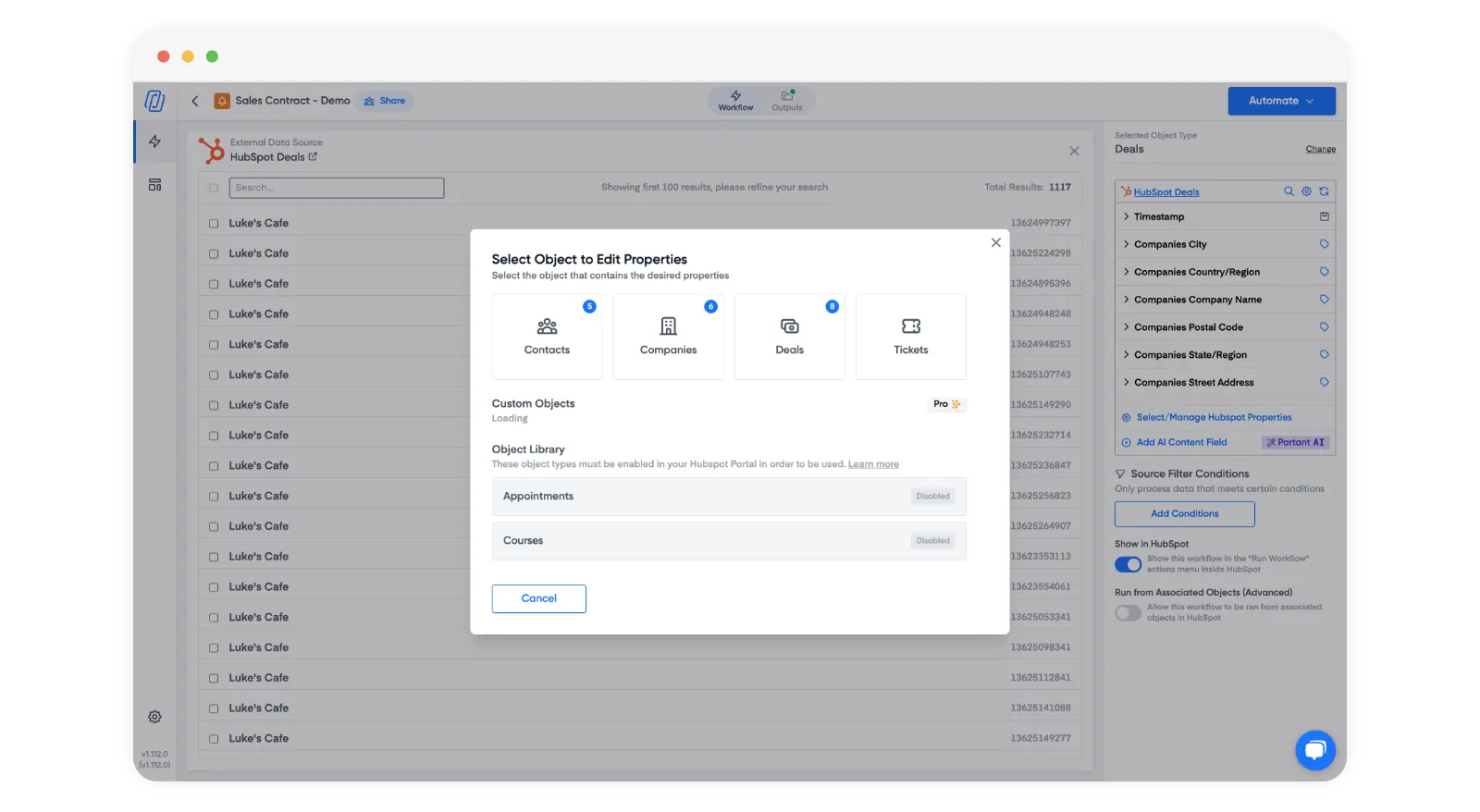
Before I touch a template, I decide where each piece of data lives. I start with a plain list of what the invoice needs to say: legal entity name, billing address, tax IDs, payment terms, due date, purchase order references, and the product table. Then I map each one to the right place in HubSpot.
Company usually holds the legal name and billing address. Contact holds the person receiving the PDF and any accounts payable email. The deal holds amounts, timing, custom terms, and anything tied to the opportunity. Line items hold the product-level detail.
If any of that feels unclear, tidy up your properties before you automate. Messy data shows up on invoices faster than almost any other customer-facing document.
When I need a checklist, I point people to How to audit your HubSpot data so every sales document goes out right and The HubSpot properties I set up so sales documents stay accurate.
Step 2: Align properties so tags never lie
Once that's in place, I make sure HubSpot fields are clearly named and consistent. Use dropdown fields for payment terms instead of free text. Keep numbers in number fields. Keep dates in date fields. Don't put critical billing details in deal notes where they can't be pulled into a template.
This is where data merge does the heavy lifting. It pulls exactly what the CRM contains, nothing more. If a field is empty, the invoice shouldn't go out. Or the template should show a clear fallback, not a blank line that looks like an error.
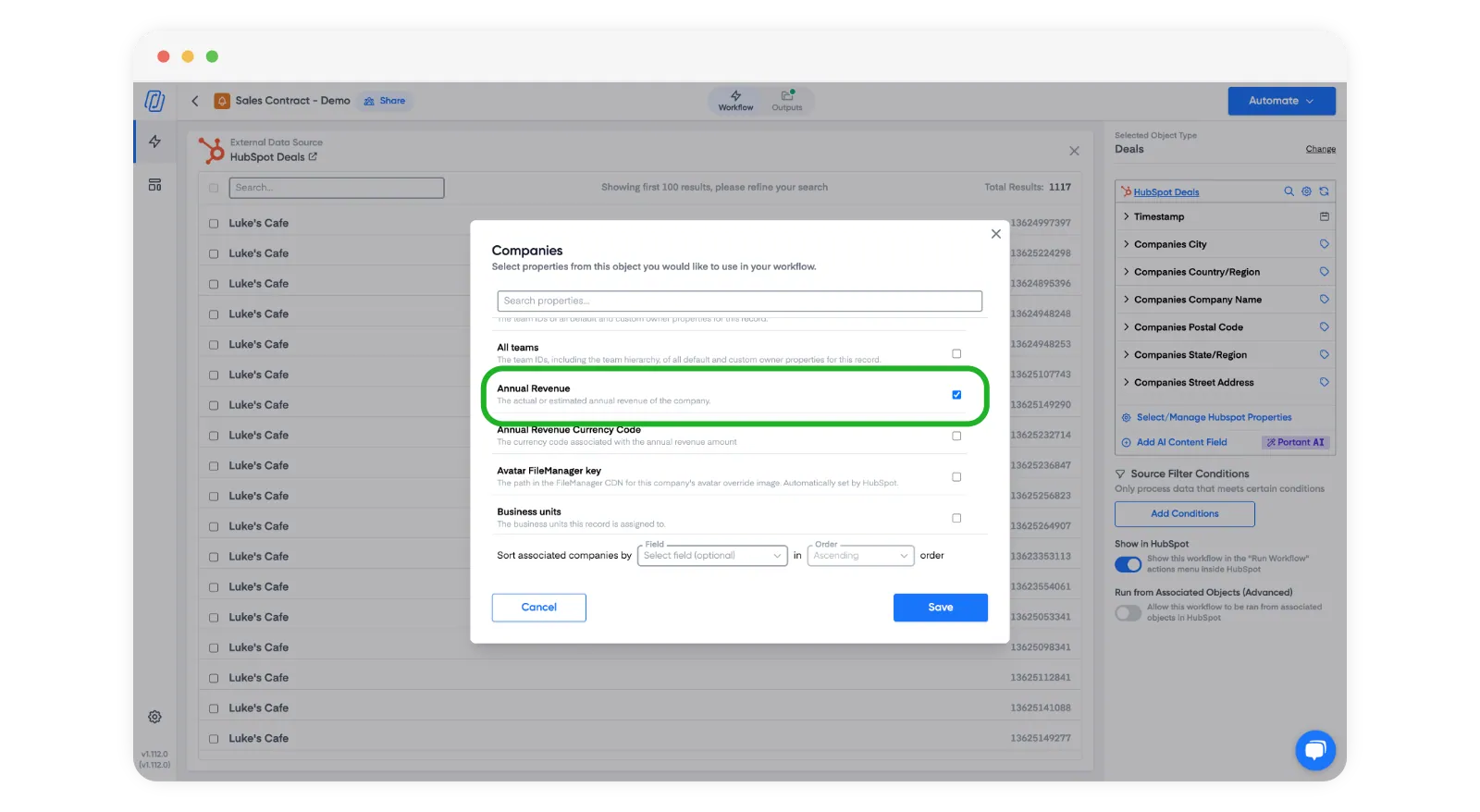
I also watch for duplicate company records. Nothing ruins an invoice faster than pulling one address on page one and a slightly different spelling on page two. Merge duplicates and agree on a standard for legal name versus trade name before you start generating invoices in bulk.
Step 3: Model line items the way finance expects
Line items are at the heart of most invoices I automate. I check that quantity, unit price, discount, and tax fields in HubSpot match how finance records revenue. If reps override prices without a paper trail, the automation will print the wrong number. I fix the process, not the template, when that happens.
I also check that product names read well on a customer-facing PDF. Internal codes can stay in HubSpot for reporting, but the description that appears on the invoice should make sense to the customer. If bundles are common, I decide whether the invoice shows individual items or a single bundle line, and I document that choice for the whole team.
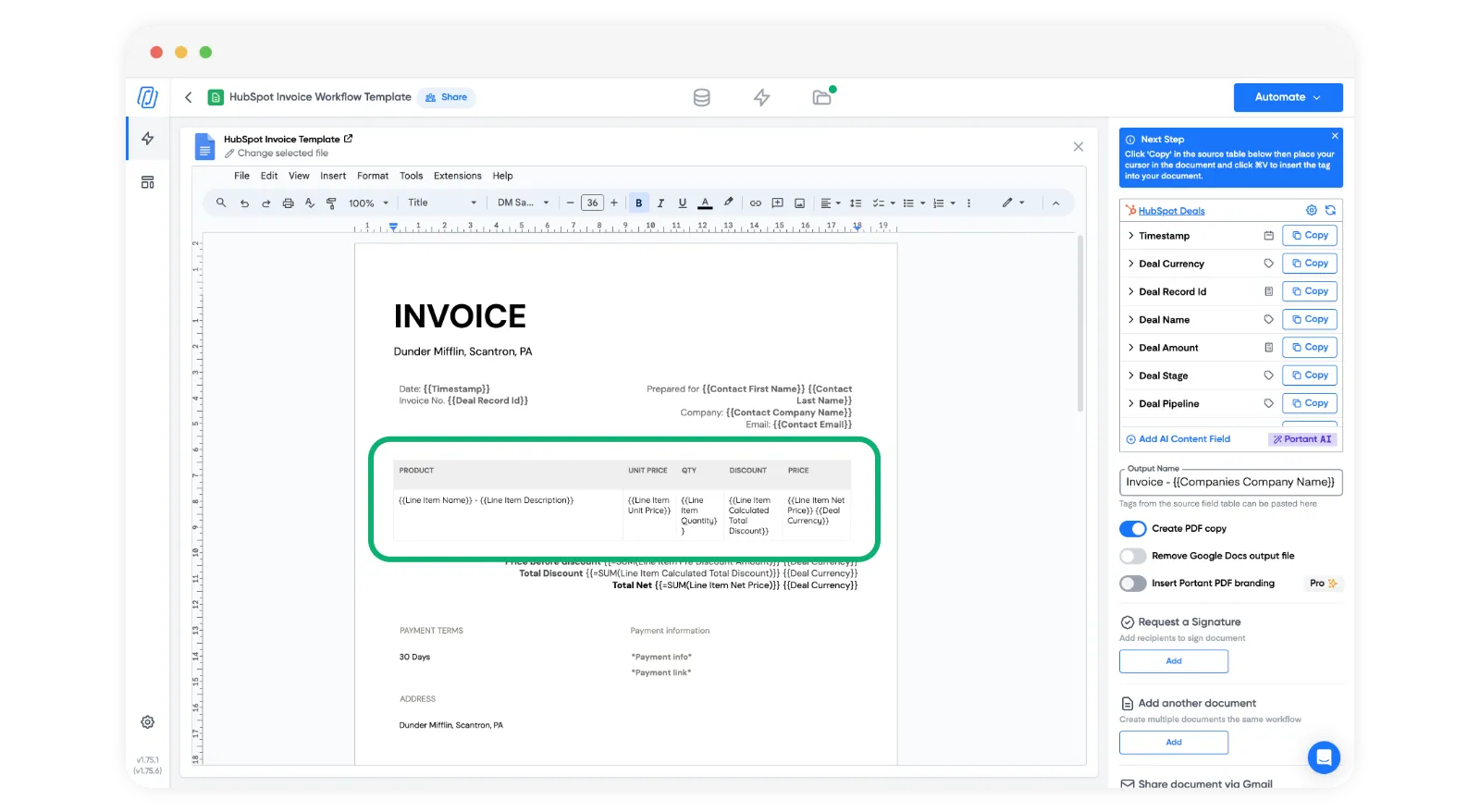
If you need a starting point, our HubSpot invoice template has a clean table structure you can build on. Even if you change it a lot, it saves hours.
Step 4: Build the invoice template with clear tags
I build the invoice in the editor my team already uses, then replace static text with tags that pull live data from HubSpot. The header pulls company and contact fields. The body pulls deal fields for terms, dates, and references. The line item table fills automatically from the deal's products.
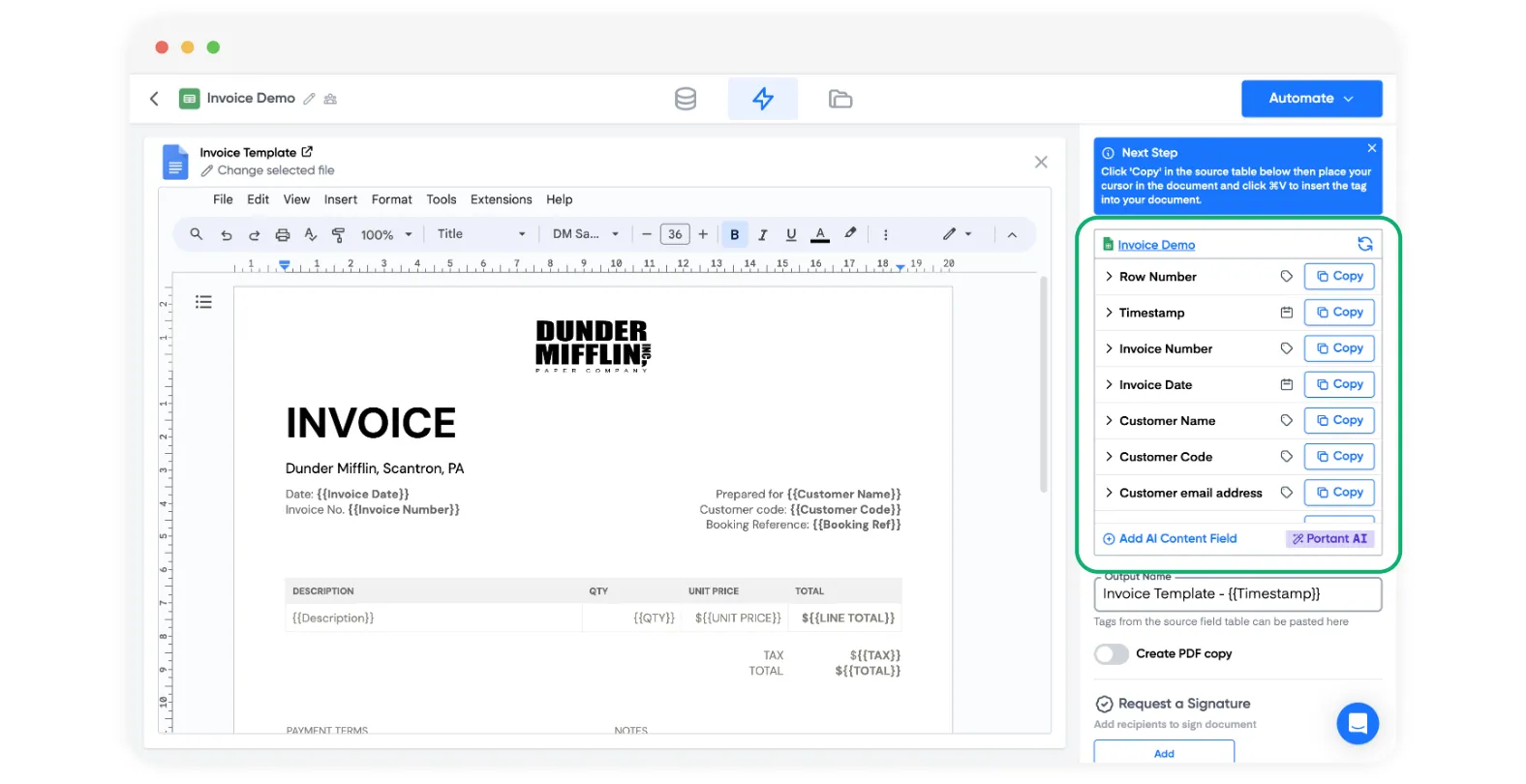
I keep the layout simple on purpose. Invoices aren't the place for creative design. I want clear totals, obvious due dates, and a payment section that legal has already approved. If marketing wants something more polished, I point them to proposals.
I add version notes in the template footer so finance knows which version of the template was used when the PDF was created. That sounds like overkill until you need to trace a tax rule change mid-quarter.
Step 5: Set up workflow triggers and approval steps
Automation without checks is how you email an invoice with a zero total. I set up workflows thinking about safety, not just speed. Typical triggers include moving to closed won, setting a custom property like ready-to-invoice, or adding a finance review step on deals above a certain value.
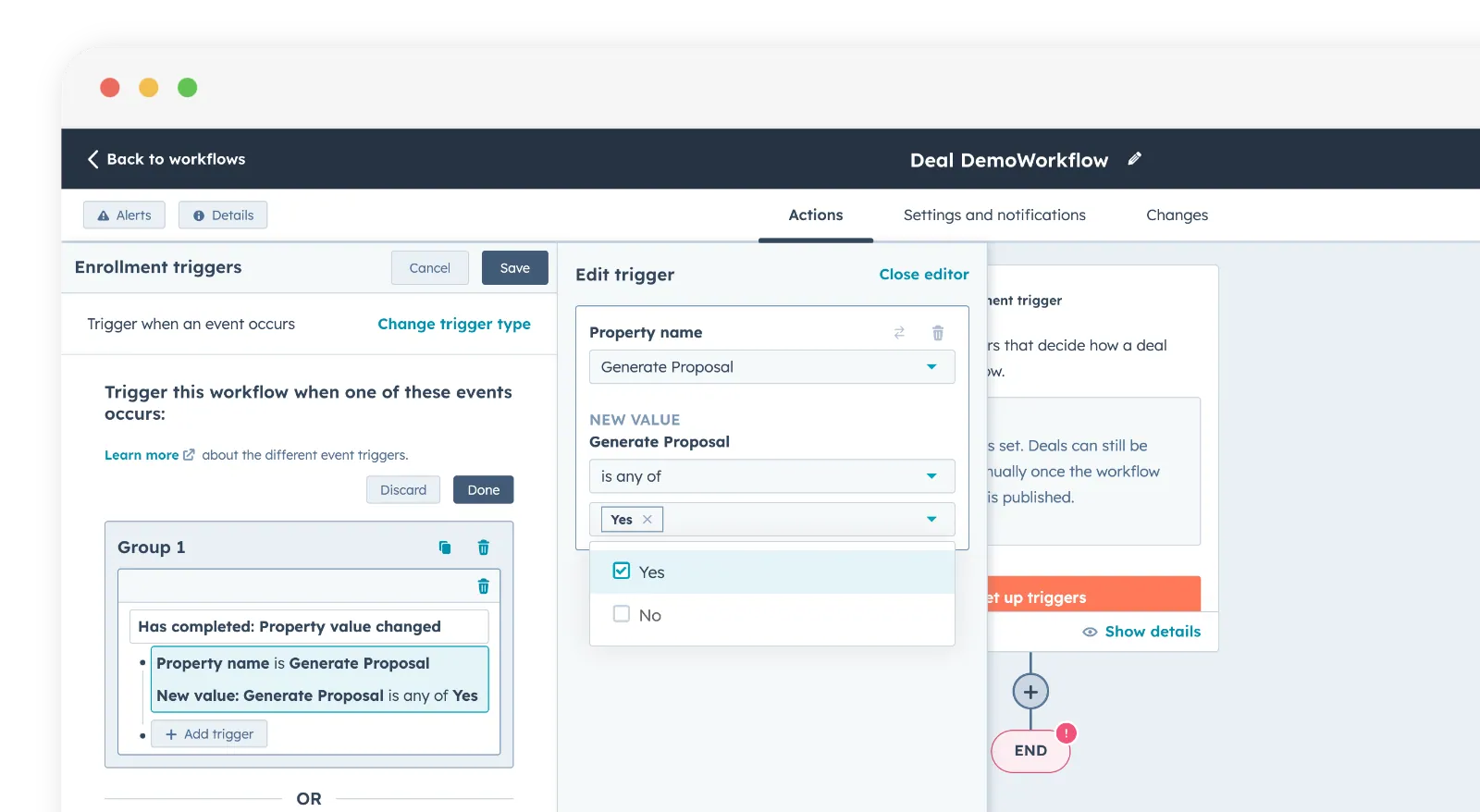
Before any trigger fires, I make sure the minimum fields are filled in: billing address, correct legal entity, purchase order when needed, and line items that add up to the amount the customer expects. If HubSpot workflows can't cover every rule, I combine workflow steps with a manual review inside Portant for edge cases.
I also train reps on timing. If a deal jumps stages during a data import, you can generate documents early. I add training, not more software, when I see that pattern.
Step 6: Generate the PDF and sync it back to the deal
When the template and triggers are stable, I generate a PDF and store it on the deal, not as an email attachment that disappears. Everyone on the team can see the same document in the same place.
The deal becomes the single source of truth for what was billed, when, and which template version was used. I also agree with finance upfront on whether HubSpot or the accounting system tracks payment status. The invoice PDF is what the customer sees. The ledger may live elsewhere, but there's no confusion about what was sent.
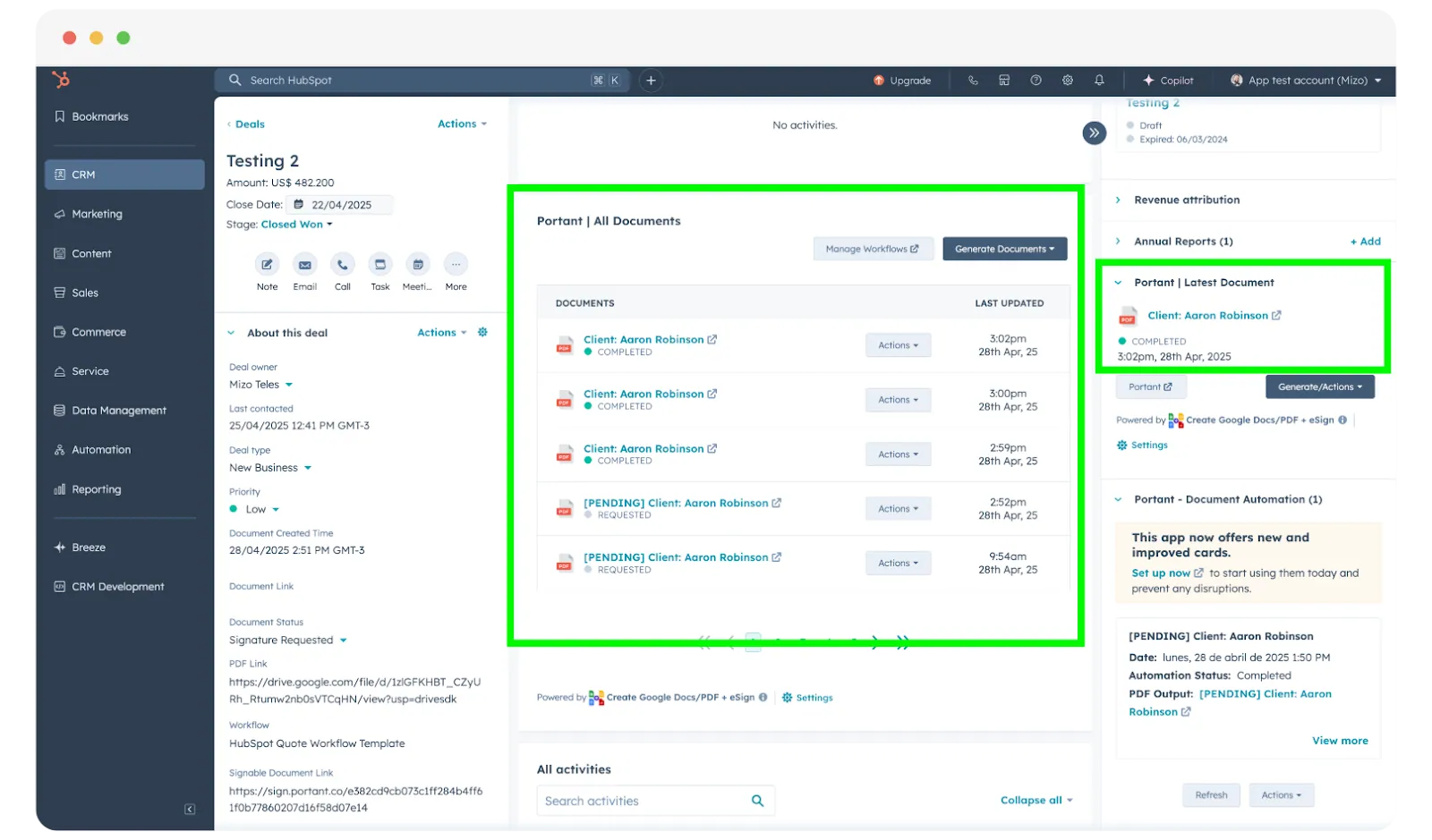
On a good day, the whole process from deal stage change to finished PDF takes minutes. That's an entire afternoon of copy-paste gone.
How I test, launch, and iterate without surprises
Before you go live across every deal: generate ten invoices from recent deals and compare each one to what finance would've produced manually. The gaps you find in that sample are much cheaper than the ones a customer finds.
I never go live on every deal at once. I pick a handful of representative deals, generate invoices, and look for rounding issues, tax lines, discount stacking, and currency symbols. I fix data problems before I widen the rollout.
After launch, I review a weekly sample until things settle. If support tickets about invoices spike, that usually points to a data problem in the CRM, not a reason to stop automating.
If you're building this for the first time, expect two weeks of nitpicks. That's normal. The payoff is fewer emergency edits the night before month end, and a calmer handoff between sales and finance.
Over 920,000 users have automated more than 5.1 million documents with Portant, and teams report reclaiming around 125 hours per month by cutting invoices out of spreadsheets and email threads.
Frequently asked questions
Can I automate invoices from HubSpot?
Yes. A HubSpot-connected document automation app like Portant generates the invoice PDF straight from your deal, company, contact, and line item data, then saves the finished file back to the deal automatically, so the invoice never needs to be rebuilt by hand in a spreadsheet.
Can HubSpot store the invoice PDF on the deal?
Yes, that's the pattern I recommend. When the PDF is attached to the deal, everyone works from one place and you cut down on duplicate files in inboxes.
What if line items and deal amount disagree?
I stop generation until they match, or until there's a clear reason for the difference recorded on the deal. A mismatch that nobody notices is how you lose trust with finance and with the customer.
Do I need custom properties for invoicing?
Often yes, for things like purchase order number, billing contact email, or tax exemption status. I add custom fields when the need comes up regularly, not as a way to avoid agreeing on a standard process.
Can I automate invoices without changing our ERP?
In many cases yes. HubSpot and Portant handle creating and sending the invoice. Your accounting system can still track payments and revenue. The important part is being clear about which system is responsible for each step.
How do I keep templates compliant across regions?
I create separate templates or sections by region and tax rules using structured fields, not one-off notes. I review with legal when rules change, and I keep old template versions so past invoices can always be traced back.