
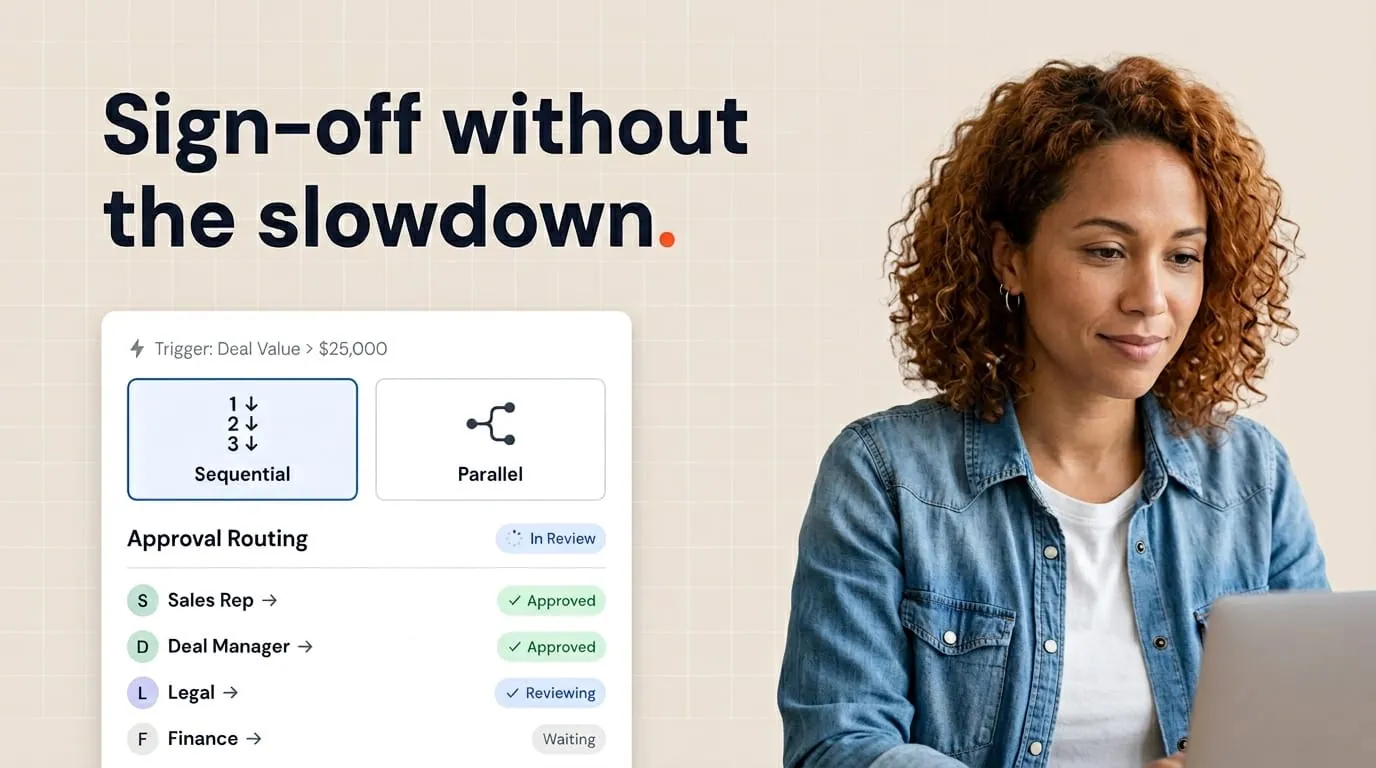
Route documents by a threshold, not a blanket rule: send anything above a set deal value, discount level, or set of non-standard terms to a manager or legal, and let everything below it generate and send automatically from a locked template. In HubSpot, a tool like Portant can trigger that routing from deal properties, log every approval to the deal timeline, and release the document the moment it's approved.
Approvals exist for good reasons. Legal wants standard terms. Finance wants margin checks. Leadership wants visibility before a big discount goes out. The problem isn't that approvals exist. It's that they sit in email threads while the buyer goes cold. The best teams treat approvals as part of deal velocity, not a detour.
This is how I design document approval workflows in HubSpot with Portant that protect governance and keep deals moving.
For the full picture of how document generation, data merge and eSignature fit together in HubSpot, see the complete guide to document automation in HubSpot.
How do I build a document approval workflow for sales?
Start by defining what actually needs a second pair of eyes: deals above a certain size, non-standard discounts, or custom contract language. Everything else should auto-generate and send without touching a queue. Wire that threshold to a HubSpot deal property so the routing decision is automatic, not a judgment call made in Slack. A tool like Portant can generate the document from the deal record, hold it for approval when the threshold is crossed, and release it the moment an approver signs off, all inside HubSpot instead of split across email and a separate e-signature tool.
Start with the decision, not the tool
List the decisions that truly need a second pair of eyes. Common ones include discounts beyond X percent, non-standard payment terms, custom MSA language, and contract value above a threshold. Everything else should default to fast self-service generation from approved templates. If you need approval for routine quotes, you've trained reps to work around you.
Map approvals to deal properties
HubSpot shines when properties drive behavior. Create clear fields for approval status, approver, and timestamps. When document tools write back to the deal timeline, leadership can report on cycle time without chasing screenshots. If you're aligning stages with documents more broadly, read How I use HubSpot deal stages to trigger the right document every time.
Use thresholds to keep small deals moving
Segment by ARR band or deal amount. Below the threshold, auto-generate and send from a locked template. Above the threshold, route to approval workflows with clear response time commitments. Publish those SLAs in your enablement doc. "We respond within four business hours" beats "someone will look eventually."
Design parallel approvals only when needed
Sequential approvals are simple to reason about. Parallel approvals help when legal and finance can review independently. Don't default to parallel because it sounds faster. Two queues can mean two bottlenecks. Pick the pattern that matches how your company actually decides.
Connect contract generation to the same record
When contracts are generated from live deal data with contract automation, approvers see the same numbers the rep promised. Use document workflows so generate, approve, and eSign stay in one chain. The moment you export to a file outside HubSpot, you lose the timeline everyone trusts.
Measure what you want to improve
Track time from "ready to generate" to "sent to customer" and from "sent" to "signed." If approvals inflate the first interval, your process is misfit, not your reps. HubSpot reports plus document records make that visible. If you can't measure it, you'll argue about it in QBRs instead of fixing it.
Reporting and QBR-ready views
Build dashboards leadership can read without a translator. At minimum, show median approval time, count of deals waiting on each approver, and percentage of documents that needed a revision after first review. If legal or finance is always the long pole, either add capacity or raise the threshold so only true exceptions reach them.
Pair document records with deal stage reports so you can answer "how many six-figure deals are stuck in legal review this week" in one glance. That's the kind of operational honesty executives respect. It also prevents the anecdote-driven meeting where everyone argues from memory.
When you present in QBRs, tie the metrics to revenue. Faster approvals mean faster signatures. Faster signatures mean cleaner forecasts. The CRM story and the document story should be the same story.
If you run a global team, publish approval coverage hours per region. Nothing erodes trust faster than a deal stuck because London thought San Francisco was online. A simple table in your internal wiki prevents weekend heroics that burn out your best approvers.
Communication templates for approvers
Give approvers a checklist: pricing matches the deal, terms match the template version, counterparty details align with CRM data, and exceptions are noted in a property for audit. Short, repeatable, boring. Boring is good. It scales.
How Portant handles this
Portant connects directly to HubSpot. You can pull in line items with data merge, run approval workflows, and save finished documents back to the deal record. If your stack is already HubSpot-centric, a native integration is simpler than bolting on a separate tool.
Over 920,000 users have automated more than 5.1 million documents with Portant, and teams report reclaiming around 125 hours per month by moving approvals and signatures out of email threads and shared drives.
Frequently asked questions
How do I build a document approval workflow for sales?
Route documents by a threshold, not a blanket rule: send anything above a set deal value, discount level, or set of non-standard terms to a manager or legal, and let everything below it generate and send automatically from a locked template. In HubSpot, a tool like Portant can trigger that routing from deal properties, log every approval to the deal timeline, and release the document the moment it's approved.
Should legal edit inside Google Docs?
Prefer comments and tracked suggestions on a generated draft, then merge accepted changes back into the main template. Random one-off edits without template updates guarantee repeat work.
How do we handle urgent deals?
Define an escalation path with named backups for approvers. If only one person can say yes, you have a single point of failure.
Can we auto-progress deal stages after approval?
Yes, when your workflow updates properties or activities HubSpot automation listens for. Keep stage logic visible to RevOps so changes don't surprise reps.