
Contract template
Startup NDA Template
Automatically create startup nda templates with this NDA template.
Trusted by teams at










Startup NDA Template
Creating a Startup NDA Template is crucial for protecting your business's confidential information. An NDA, or Non-Disclosure Agreement, ensures that sensitive data shared with partners, employees, or investors remains secure. Whether you're looking for an NDA template, NDA template free, or NDA template PDF, having a reliable NDA document is essential. Portant offers a seamless solution to automate your NDA template using Google Docs, making it easy to customize and manage your NDA forms. With Portant, you can access a free NDA template, NDA template Word, or NDA template PDF free, ensuring you have the right NDA format for your needs.
Portant's platform provides a comprehensive NDA template for startup businesses, allowing you to create NDA agreements effortlessly. Whether you need an NDA sample, NDA draft, or NDA agreement template, Portant has you covered. The platform supports NDA template Word free and NDA template PDF formats, making it convenient to download and print your NDA document. By using Portant, you can streamline the process of creating NDA forms, ensuring that your NDA agreement is both legally sound and easy to understand. This is particularly useful for startups looking for a simple NDA template or NDA contract template to protect their business interests.
For those seeking a mutual NDA template or employee NDA template, Portant offers customizable options to suit various business needs. With the ability to automate your NDA agreement form, you can focus on growing your business without worrying about confidentiality breaches. Portant's solution simplifies the creation of NDA examples and NDA agreement samples, providing peace of mind with a reliable NDA contract. Explore the benefits of using Portant to automate your NDA template California or NDA agreement PDF by visiting their template/workflow today. Protect your business with a simple NDA form and ensure your confidential information remains secure.
How to automate your startup nda templates

Step 1
Open Sheet
Select the Google Sheet you want to use as the data source for your contracts. Portant connects directly to your spreadsheet to pull in the data it needs.

Step 2
Connect Template
Connect your Google Docs, Slides, or Sheets contract template. Portant will link it to your spreadsheet data source so it knows which fields to merge.

Step 3
Customize
Customize your contract with merge tags like {{Party Name}}, {{Terms}}, and {{Effective Date}}. Format it with your branding, colours, and layout.

Step 4
Create
Create contracts automatically when new rows are added to your sheet, or generate them manually in batches. Send via email or save to Google Drive.
How to automate your business contracts with a template
How it works
Step 1
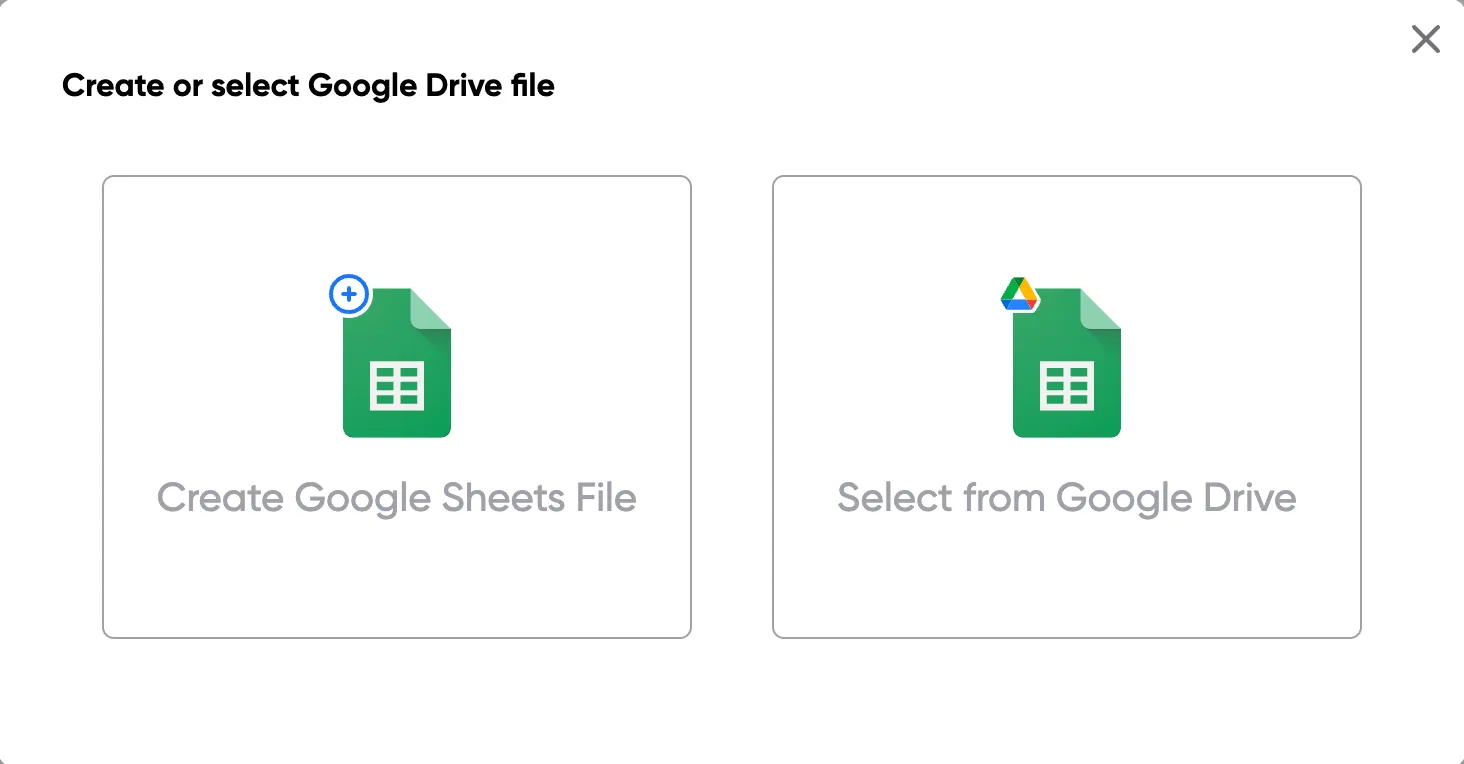
Step 1: Open a Google Sheet
Open a Google Sheet with your contract data. Include party names, terms, effective dates, and any other fields you need to merge into your contracts.
Step 2
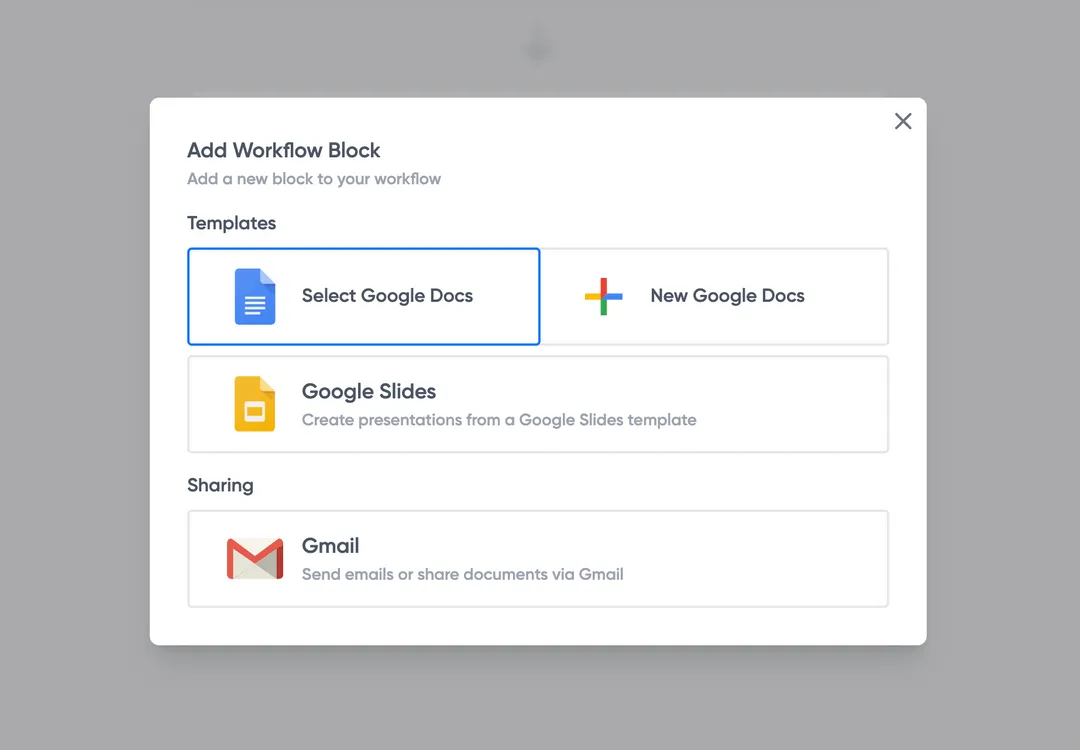
Step 2: Connect your contract template
Open the Portant add-on and connect your Google Docs contract template. Portant scans for merge tags and maps them to your spreadsheet columns.
Step 3
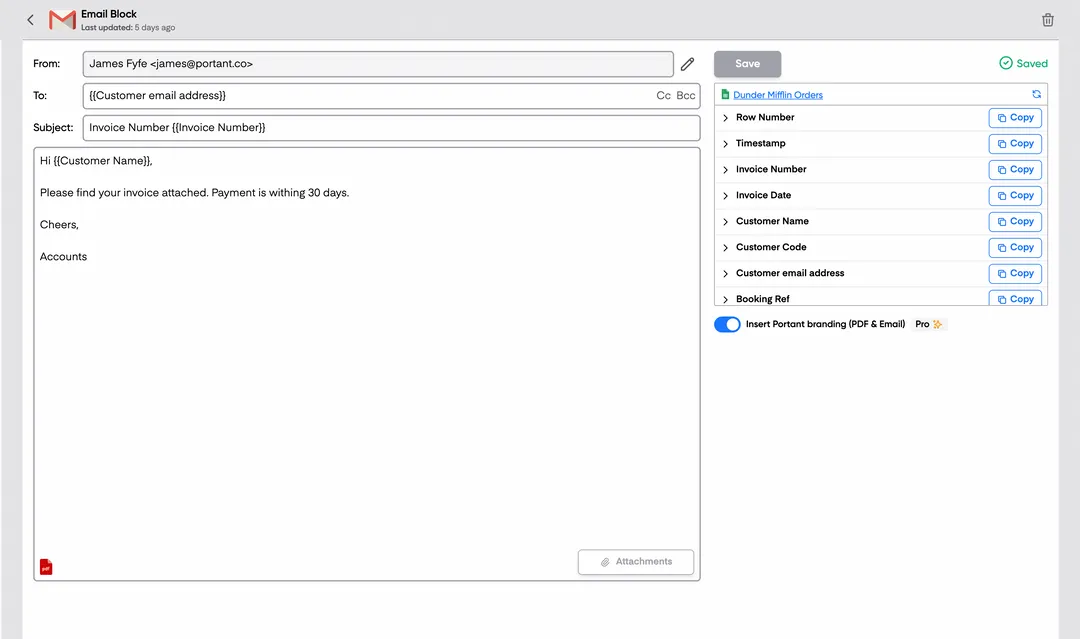
Step 3: Customize your output
Set up your delivery method. Email contracts to signers, save as PDFs in Google Drive, or request eSignatures directly through Portant. Use merge tags in emails too.
Step 4
Step 4: Automate your contracts
Turn on auto-create to generate contracts for every new row. Process rows in batches or schedule the workflow to run at set times.
Benefits
Eliminate unnecessary manual work
Stop spending hours copying and pasting data from spreadsheets into documents. Portant automates the entire process, pulling data directly from your source and generating completed documents in seconds. Focus on the work that matters, not repetitive formatting tasks.
Make your documents more accurate
Manual document creation leads to errors, from wrong names to outdated figures. Portant maps data fields directly to your template, eliminating typos and ensuring every document is accurate and consistent. Your team sends fewer corrections and your clients get the right information every time.
Built into Google Workspace
Portant works natively with Google Docs, Sheets, Slides, and Gmail. There is no new interface to learn, no data to export, and no switching between tools. Your team stays in the apps they already use while Portant handles the document generation in the background.
What teams say about Portant
“Portant has been a game-changer for Clipboard! It's saved our sales team countless hours every week by generating order forms, proposals and contracts with info from HubSpot automatically filled in.”
“This product is a gamechanger for all of those painful manual document merges. Love what you and the team have built!”
“This software brilliantly takes over the tedious process of creating and sending invoices. This not only saves time but massively reduces errors of data entry.”
“Love this product. Have been using it for over a year and the integration to Google Workspace is awesome. Lots of credit for listening to your users!”
“Truly a gamechanger! Portant streamlines these tasks and allows me to focus on the things that require my attention and problem-solving!”
“Portant has been a game-changer for Clipboard! It's saved our sales team countless hours every week by generating order forms, proposals and contracts with info from HubSpot automatically filled in.”
“This product is a gamechanger for all of those painful manual document merges. Love what you and the team have built!”
“This software brilliantly takes over the tedious process of creating and sending invoices. This not only saves time but massively reduces errors of data entry.”
“Love this product. Have been using it for over a year and the integration to Google Workspace is awesome. Lots of credit for listening to your users!”
“Truly a gamechanger! Portant streamlines these tasks and allows me to focus on the things that require my attention and problem-solving!”
Frequently asked questions
Discussing the contents of your NDA, or Non-Disclosure Agreement, with others can be risky and may lead to a breach of NDA. An NDA agreement, whether it's a simple NDA template, NDA template PDF, or NDA template Word, is designed to protect confidential information. Sharing details about your NDA document, NDA agreement, or NDA contract with unauthorized individuals can result in breaking NDA terms. This applies to any NDA form, NDA agreement template, or NDA contract template, including a startup NDA template or NDA template for startup. If you have signed an NDA agreement form or NDA agreement sample, it is crucial to adhere to the confidentiality agreement template or employee confidentiality agreement template terms. Discussing the NDA format, NDA draft, or NDA document template with others might violate the confidentiality agreement template free or mutual NDA template terms. Always ensure that any NDA examples or NDA meaning in business are understood before discussing them. If you need to share information, consult the NDA template California or NDA agreement PDF for guidance on what is permissible. To avoid any breach of NDA, refer to the NDA template free download or NDA template Word free for specific clauses. If in doubt, seek legal advice to understand the implications of your NDA agreement sample or non-disclosure agreement template. Remember, confidentiality is key in any non-disclosure agreement form or confidentiality disclosure agreement.
The five key elements of a non-disclosure agreement (NDA) include:
- Definition of Confidential Information: An NDA template must clearly define what constitutes confidential information. This can include trade secrets, business plans, customer lists, and proprietary data. A simple NDA template or a free NDA template should specify what information is protected.
- Obligations of the Receiving Party: The NDA agreement template should outline the responsibilities of the party receiving the confidential information. This includes maintaining confidentiality and not disclosing the information to third parties. An NDA form or NDA document should specify these obligations.
- Exclusions from Confidential Information: An NDA template PDF or NDA template Word should list any information that is not considered confidential, such as information already in the public domain or information independently developed by the receiving party.
- Term of the Agreement: The NDA agreement sample should specify the duration of the confidentiality obligations. This can vary depending on the nature of the information and the needs of the parties involved. A simple NDA template Word or NDA form template should clearly state this term.
- Consequences of Breach: The NDA contract template should outline the consequences if the agreement is breached. This can include legal action or financial penalties. A standard non-disclosure agreement or confidentiality agreement template free should address these consequences.
These elements ensure that the NDA agreement form or NDA contract protects the interests of both parties and maintains the confidentiality of sensitive information. Whether using a mutual NDA template, employee NDA template, or a non-disclosure agreement template, these key elements are essential for an effective NDA.
When you need to ask someone to sign a Non-Disclosure Agreement (NDA), it's important to be clear and polite. Here’s how you can do it:
- Explain the importance: Let the other party know that signing an NDA is a standard practice to protect confidential information and is crucial for maintaining privacy in business dealings.
- Use simple language: Clearly state that you require an NDA agreement or NDA contract to ensure that any shared information remains confidential.
- Provide context: Mention that the NDA document or NDA form is a part of your standard procedure, especially if you are a startup or small business.
- Offer reassurance: Assure them that the NDA template or NDA agreement template is straightforward and is only meant to protect sensitive information.
- Be accommodating: Offer to provide a free NDA template or NDA template PDF for their review. You can mention that you have a simple NDA template or NDA template Word document available for their convenience.
- Highlight mutual benefit: Emphasize that the NDA agreement or NDA contract template is beneficial for both parties to ensure trust and confidentiality.
- Be open to questions: Invite them to ask any questions they might have about the NDA form or NDA agreement sample to ensure they are comfortable with the terms.
By following these steps, you can politely and effectively request an NDA, ensuring that all parties feel secure and informed about the confidentiality agreement.
When drafting a Startup NDA Template, NDA template, or NDA agreement, it is crucial to avoid certain pitfalls to ensure the Non-disclosure agreement template is effective and enforceable. Here are key points to consider:
- Avoid vague language: Ensure the NDA template, NDA agreement, or NDA contract template clearly defines what constitutes confidential information. Use specific terms in the NDA document template or NDA form template.
- Do not include overly broad terms: The NDA agreement template or NDA contract should not be too broad in scope or duration, as this can make it unenforceable. Specify the time frame for confidentiality in the NDA agreement form or NDA form PDF.
- Avoid omitting key clauses: Ensure the NDA template PDF or NDA template Word includes essential clauses such as the purpose of the NDA, obligations of the parties, and consequences of breach of NDA.
- Do not forget to specify exclusions: Clearly outline what is not considered confidential in the NDA format or NDA draft, such as information already in the public domain.
- Avoid using a one-size-fits-all approach: Customize the NDA template for startup or NDA template California to fit the specific needs of the business and jurisdiction.
- Do not overlook mutual obligations: If both parties are sharing confidential information, consider using a mutual NDA template or mutual non-disclosure agreement template.
- Avoid neglecting legal review: Have the NDA agreement sample or NDA example reviewed by a legal professional to ensure compliance with applicable laws.
- Do not ignore the need for signatures: Ensure all parties sign the NDA agreement PDF or NDA document to make it legally binding.
- Avoid forgetting to include remedies for breach: Clearly state the consequences of breaking NDA or breach of NDA in the NDA agreement or NDA contract.
By avoiding these common mistakes, you can create a more effective and enforceable NDA agreement, NDA document, or confidentiality agreement template.
When reviewing a Startup NDA Template, NDA template, or NDA agreement, it's crucial to identify red flags that could indicate potential issues. Here are some common red flags to watch out for in an NDA document, NDA agreement, or NDA contract template:
- Overly Broad Language: An NDA template or NDA agreement that uses vague or overly broad terms can be problematic. Ensure the NDA document template specifies what constitutes confidential information.
- Indefinite Duration: A Non disclosure agreement template or NDA form that does not specify a time limit for confidentiality obligations can be a red flag. Look for a reasonable time frame in the NDA agreement template.
- Unilateral Obligations: If the NDA agreement or NDA contract is one-sided, where only one party is bound by confidentiality, it may not be fair. Consider a Mutual NDA template or mutual non disclosure agreement template for balanced obligations.
- Lack of Definition: A simple NDA template or NDA form template should clearly define what is considered confidential. If the NDA agreement sample lacks this, it could lead to disputes.
- No Exclusions: A standard non disclosure agreement or generic non disclosure agreement should include exclusions for information that is already public or independently developed. If these are missing, it could be a red flag.
- Unclear Breach Consequences: The NDA agreement form or NDA contract template should outline the consequences of a breach of NDA. If this is missing, it could lead to legal complications.
- Jurisdiction Issues: An NDA template California or NDA template for startup should specify the jurisdiction for legal disputes. If this is unclear, it could complicate enforcement.
- Excessive Penalties: Be wary of NDA forms or NDA agreement PDFs that impose excessive penalties for breaking NDA. Ensure the penalties are reasonable and enforceable.
- Employee NDA Template Concerns: For an employee confidentiality agreement template, ensure it doesn't overly restrict future employment opportunities.
Reviewing these elements in an NDA template Word, NDA template PDF, or NDA template free download can help identify potential red flags and ensure the NDA agreement is fair and enforceable.
The most important elements in an NDA, or Non-Disclosure Agreement, include:
- Definition of Confidential Information: Clearly define what constitutes confidential information in the NDA template, NDA agreement, or NDA document. This can include trade secrets, business plans, customer lists, and proprietary data.
- Parties Involved: Identify all parties involved in the NDA agreement, whether it's a mutual NDA template or a one-way NDA contract. This includes the disclosing party and the receiving party.
- Obligations of the Receiving Party: Outline the obligations of the receiving party in the NDA form, NDA agreement form, or NDA contract template. This includes keeping the information confidential and not using it for unauthorized purposes.
- Duration of Confidentiality: Specify the duration for which the NDA agreement or NDA contract will remain in effect. This can vary depending on the nature of the information and the industry.
- Exclusions from Confidentiality: List any exclusions where the NDA template or NDA agreement does not apply, such as information that is publicly available or already known to the receiving party.
- Consequences of Breach: Detail the consequences of breaching the NDA, including potential legal action or financial penalties. This is crucial in a breach of NDA or breaking NDA scenario.
- Governing Law: State the governing law that will apply to the NDA agreement template or NDA contract, which can be important in a specific jurisdiction like an NDA template California.
- Signatures: Ensure that all parties sign the NDA document, NDA form, or NDA agreement PDF to make it legally binding.
These elements are essential for ensuring that the NDA template, whether it's a simple NDA template, free NDA template, or mutual non-disclosure agreement template, effectively protects confidential information in business dealings.
The hardest subject in an NDA, or Non-Disclosure Agreement, often depends on the specific context and the parties involved. However, some common challenging areas include:
- Scope of Confidentiality: Clearly defining what constitutes confidential information can be difficult. An NDA template, NDA template free, or NDA template PDF should specify what information is protected under the NDA agreement, NDA document, or NDA contract.
- Duration of Obligation: Determining how long the confidentiality obligations last can be complex. A simple NDA template or NDA agreement template should outline the time frame for which the NDA agreement or NDA contract is enforceable.
- Exclusions from Confidentiality: Identifying what information is not covered by the NDA can be tricky. NDA examples or NDA samples often include sections that specify exclusions, such as information already known to the public.
- Legal Jurisdiction: Deciding which legal jurisdiction governs the NDA can be challenging, especially in international agreements. An NDA template California or NDA agreement template may specify the applicable laws and courts.
- Consequences of Breach: Outlining the penalties or actions in case of a breach of NDA is crucial. NDA agreement sample or NDA contract template should include details on what happens if the NDA is violated.
Using a free NDA template, NDA template Word, or NDA template PDF free can help address these challenges by providing a structured format. A mutual NDA template or employee NDA template can also offer guidance on specific scenarios. For startups, an NDA template for startup or simple NDA template Word can simplify the process. Always ensure that the NDA agreement form or NDA form template is tailored to your specific needs to avoid potential issues.
The core values of an NDA, or Non-Disclosure Agreement, revolve around confidentiality, protection, and trust. An NDA template, whether it's a free NDA template, NDA template PDF, or NDA template Word, is designed to ensure that sensitive information remains confidential. Here are the core values:
- Confidentiality: The primary purpose of an NDA agreement, NDA form, or NDA contract is to maintain the confidentiality of shared information. This is crucial in business settings, especially for startups using a startup NDA template or NDA template for startup.
- Protection of Intellectual Property: An NDA document or NDA agreement PDF helps protect intellectual property, ensuring that proprietary information, trade secrets, and business strategies are not disclosed without permission.
- Trust Building: By using an NDA template, NDA agreement form, or NDA contract template, parties involved can build trust, knowing that their information is safeguarded.
- Legal Assurance: An NDA agreement template or NDA contract provides legal assurance that any breach of NDA or breaking NDA will have consequences, thus deterring unauthorized disclosure.
- Clarity and Understanding: A simple NDA template or simple NDA form provides clear guidelines on what constitutes confidential information, ensuring all parties understand their obligations.
- Mutual Protection: In cases where both parties share sensitive information, a mutual NDA template or mutual non-disclosure agreement template ensures that both parties are equally protected.
- Standardization: Using a standard non-disclosure agreement or generic non-disclosure agreement ensures consistency in how confidentiality is maintained across different agreements.
These core values are integral to any NDA format, NDA draft, or NDA document template, ensuring that business dealings are conducted with integrity and respect for privacy.
The main function of an NDA, or Non-Disclosure Agreement, is to protect confidential information shared between parties. An NDA agreement, also known as a confidentiality agreement template or a confidentiality agreement, ensures that sensitive information such as trade secrets, business plans, or proprietary data is not disclosed to unauthorized parties. This is crucial for startups and businesses to maintain a competitive edge. An NDA template, whether it's a simple NDA template, NDA template PDF, or NDA template Word, provides a structured format for outlining the terms of confidentiality. The NDA document specifies what information is considered confidential, the obligations of the parties involved, and the consequences of a breach of NDA. NDAs can be mutual, where both parties agree to protect each other's information, or unilateral, where only one party discloses confidential information. An NDA form or NDA agreement PDF can be customized to fit specific needs, such as an NDA template for startup or an employee NDA template. By using an NDA contract template or NDA agreement template, businesses can ensure that their confidential information remains secure, preventing unauthorized use or disclosure. This is especially important in business transactions, partnerships, or when hiring employees. A well-drafted NDA contract or NDA agreement form can help prevent the breaking of NDA and protect the interests of all parties involved.
Explore related templates
Vendor NDA Template
Automatically create vendor ndas with this NDA template.
View template Contract templateUnilateral NDA Template
Automatically create unilateral ndas with this NDA template.
View template Contract templateEmployee NDA Template
Automatically create employee ndas with this NDA template.
View template Contract templateNDA Template (Non-Disclosure Agreement)
Create, customize, and e-sign a non-disclosure agreement in minutes. Free NDA template, automated with Google Docs, exportable to Word or PDF.
View template Contract templateMutual NDA (mNDA) Template
Create, customise, and e-sign a mutual non-disclosure agreement (mNDA) in minutes. Free template, automated with Google Docs.
View template