The contract is right, the buyer said yes, and then nothing. Someone's on holiday, buried in approvals, or the email landed under a hundred others.
Automatic reminders keep timing consistent so nothing falls through because nobody remembered to follow up.
This guide covers how I set up signature reminders in HubSpot using Portant: cadence, reminder copy, which properties to sync, and when to pick up the phone instead. If you're cleaning up a messy first install, skim document automation setup mistakes so your reminders sit on top of clean data.
For the full picture of how document generation, data merge and eSignature fit together in HubSpot, see the complete guide to document automation in HubSpot.
Why automation beats ad hoc follow up
Reps are optimistic and busy. They remember the loud deals and forget the medium ones that would've closed if someone nudged on Wednesday. Automated reminders remove the guesswork. Every document gets the same respectful sequence unless you branch on purpose.
Automation also creates coaching data. When I see a high view rate but low completion, I look for confusing terms or a signer who doesn't have authority. When I see low views, I look for wrong email addresses or internal forwarding rules blocking the vendor domain.
And reminders are one of those tasks that seem small on their own but add up fast. Repetitive follow-up is exactly the kind of work that should live inside a workflow.
The cadence I start with before I tune by segment
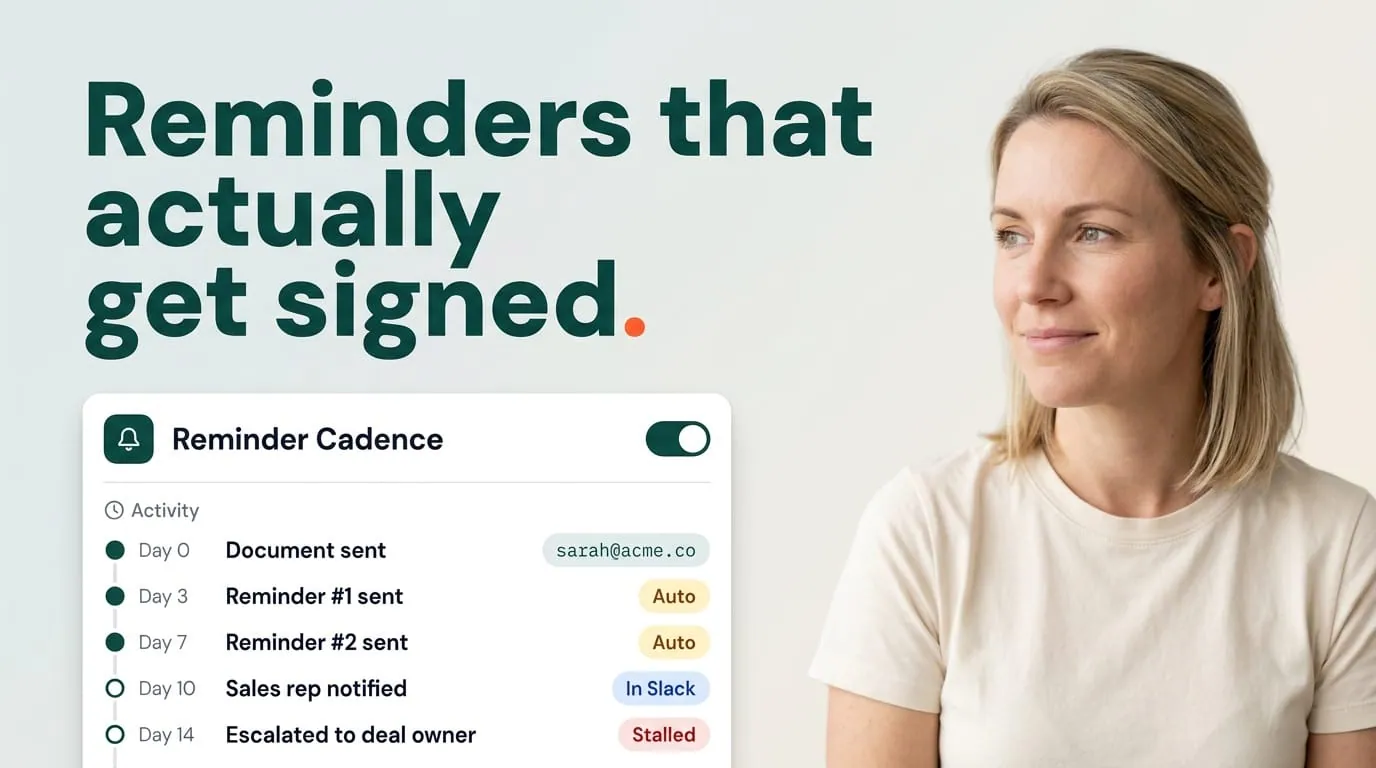
I start with a conservative curve for enterprise: day zero send, reminder at two business days if unsigned, second reminder at four, third at seven, then an owner task. For mid-market and SMB I tighten slightly because decision cycles are shorter and the risk of ghosting is different.
I always leave room for holidays. Nothing looks worse than five pings while your counterparty's office is closed for a week. I pause workflows globally when our own company observes closures and train teams to pause individual deals when they know the buyer is away.
Copy that sounds human, not robotic
I keep reminder emails short. One sentence of context, one clear call to action, one line offering help. I don't shout in subject lines. I include the deal or company name so the signer knows which thread this is.
I also match the brand voice of the selling company. Customer success owns a template library so legal doesn't see surprise wording mid-quarter. If marketing insists on a signature block, I keep it consistent across manual sends and automated nudges.
HubSpot properties and workflows I use with Portant
I want the deal to answer three questions at a glance: is a document out, has it been viewed, is it signed. I map those answers to properties that update when Portant syncs status back from the signing flow. HubSpot workflows then branch on facts instead of rep memory.
For example, if status equals "waiting signature" and last reminder is older than 48 hours, queue reminder two. If status flips to "completed," exit all reminder branches and notify finance if your playbook calls for it. I document these rules in a simple decision tree the whole revenue team can read.
When you need richer pipeline structure around documents, pair this with HubSpot deal stages for document workflows so stages and reminders tell the same story.
When I override automation with a personal touch
Executive sponsors, government buyers, and anyone navigating a formal committee deserve slower automation or none at all. I tag those accounts and route them to a playbook where the AE owns timing and CS helps with stakeholder mapping.
I also pause reminders during active redlines. Nothing signals chaos like a reminder to sign a version that's already outdated. A property like "negotiation in progress" should suppress pings until legal clears the next send.
How I coordinate with customer success and onboarding
Reminders don't stop at closed won. I reuse the same approach for onboarding packets, data processing agreements, and success plans that need a countersignature after the sale. CS sees the same HubSpot properties reps saw, so nobody rebuilds a parallel spreadsheet of who still owes a signature.
When a customer stalls on a post-sale document, I treat it as a health signal. Sometimes procurement is backlogged. Sometimes the champion left. The reminder keeps the thread warm while the owner investigates what's going on.
I keep the reminder templates in the same place I keep tags, so updates roll out once. When marketing refreshes positioning, I update the nudge copy at the same time. That sounds like overkill until you see how many deals touch automated email in a quarter.
Metrics I review with RevOps each month
Median time from sent to signed, reminder count per completed deal, decline or void rate, and view-to-sign conversion. If reminders climb but speed doesn't improve, the bottleneck isn't awareness. It's content, authority, or pricing.
When a reminder sequence saves a deal that would have gone quiet, I share the numbers with leadership. It makes the case for investing in the next automation project.
Tip: Test reminders internally first. If your own legal team finds the tone annoying, your customers will too.
Frequently asked questions
Should reminders come from the rep or the system?
I use both. Automated reminders keep timing consistent, and I coach reps to add a personal note when the relationship matters more than scale.
How many reminders before I stop?
Three to five over one to two weeks is my default for commercial SaaS, then human escalation unless counsel says otherwise.
Can HubSpot show if a signer opened the document?
Yes. Portant syncs status fields back to HubSpot, so you can see whether a document has been viewed or signed. That visibility is what makes your workflows trustworthy.
What properties should trigger reminders?
Document status, last reminder timestamp, and stage checks so you don't ping completed deals.
How do I avoid annoying legal or procurement?
Short, respectful copy. Sensible spacing. And account-level overrides for sensitive buyers who need a slower cadence.