

Every B2B service relationship eventually runs into the same problem: each new project means renegotiating the same payment terms, confidentiality rules, and liability caps from scratch. A master service agreement solves that. It is the umbrella contract that sets the standard terms once, so every statement of work or project order underneath it can focus on scope and price. If you work with the same clients or vendors across multiple engagements, you need one.
What is a master service agreement?
A master service agreement (MSA) is a framework contract between two parties that establishes the general terms and conditions governing their entire business relationship. It does not cover the details of any specific project. Instead, it answers the questions that apply to every engagement: how payment works, who owns the intellectual property, what happens if there is a dispute, and how either party can end the relationship.
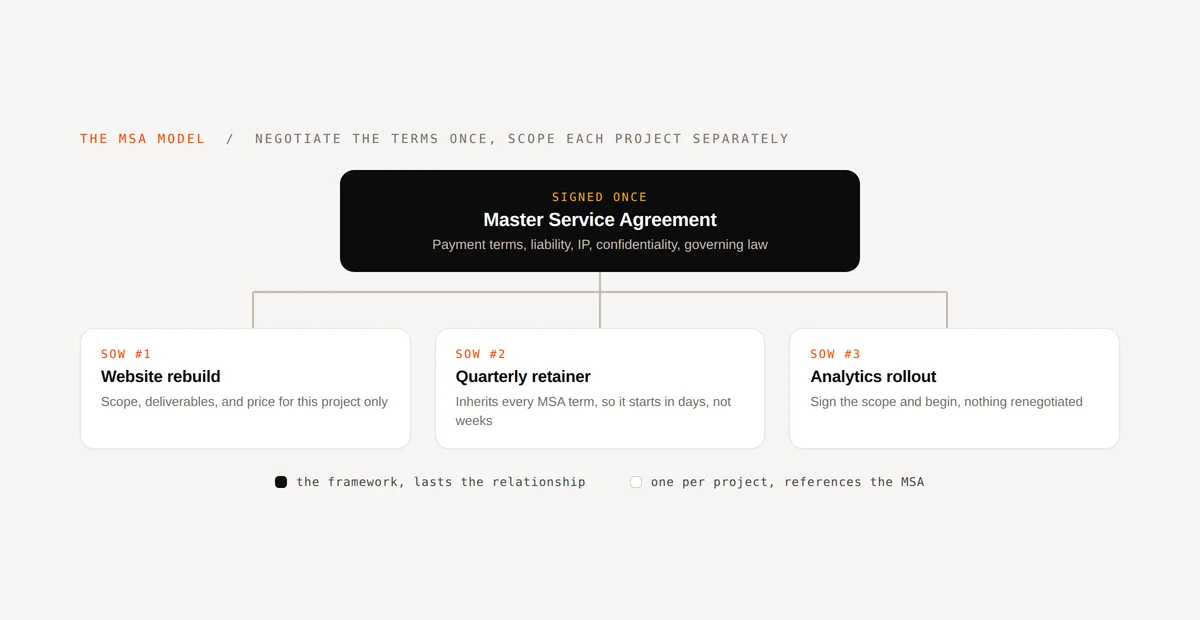
Individual projects are then governed by a separate statement of work (SOW) or work order, which references the MSA and adds the project-specific details: scope, deliverables, timeline, and price.
Think of an MSA as the foundation. Each SOW is a floor you build on top. The foundation does not change; only the floors do.
How an MSA works: the framework and SOW model
Once both parties sign an MSA, the agreement stays in place for the duration of the relationship. There is typically a fixed initial term with automatic renewal unless either party gives advance notice to exit.
When a new project comes up, you issue a statement of work. Because the SOW references the MSA, it inherits all the standard terms automatically. You do not renegotiate payment schedules, indemnification clauses, or governing law for each engagement. You agree on scope and price, both parties sign the SOW, and work begins.
This is why professional services firms, consulting companies, marketing agencies, and SaaS vendors rely on MSAs. The relationship produces more work over time, and the MSA means that each new piece of work starts faster.
Key clauses in a master service agreement
A well-drafted MSA covers the terms that would otherwise need to be renegotiated on every project. The core clauses:
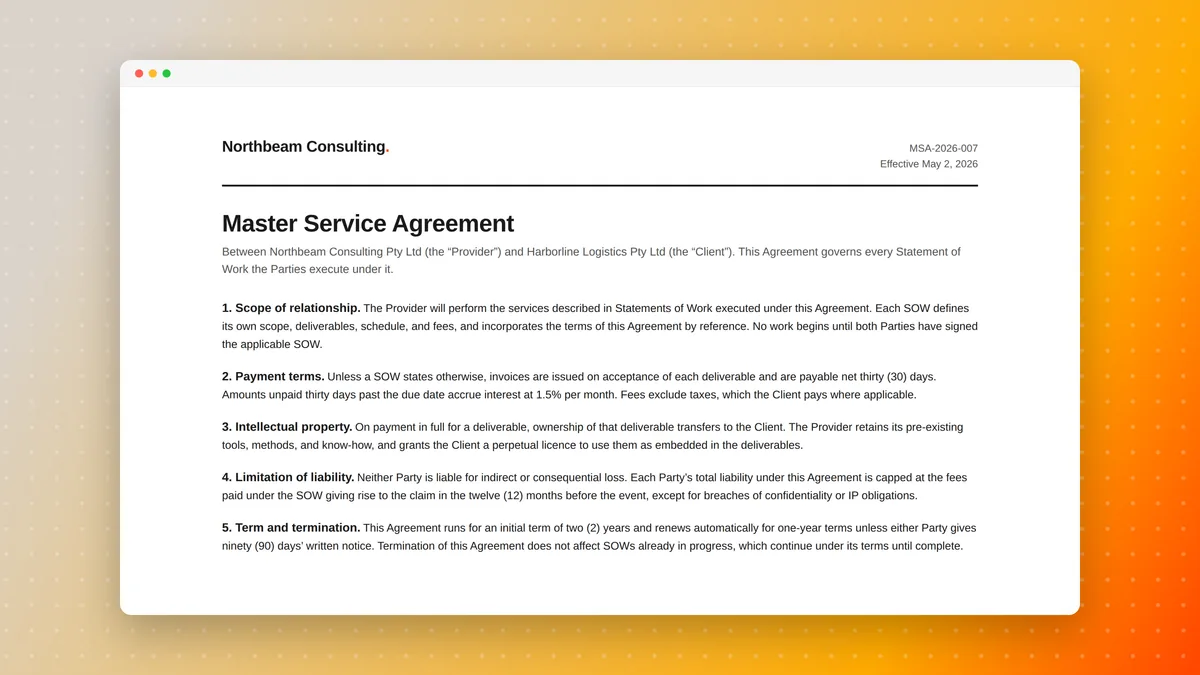
- Payment terms. Net-30 or net-60 timelines, late-payment interest rates, accepted payment methods. Setting this once avoids the awkward renegotiation on invoice two.
- Intellectual property ownership. Who owns the work product? Commissioned deliverables typically transfer to the client, but tools, frameworks, or pre-existing IP the vendor brings to the project stay with the vendor. Spell this out clearly before work starts.
- Confidentiality. Both parties share sensitive information throughout an ongoing relationship. An NDA clause inside the MSA covers everything, so you do not need a separate non-disclosure agreement for each project. See how this connects to eSignature compliance if your team handles regulated data.
- Limitation of liability. Caps the financial exposure for either party if something goes wrong. A common approach limits liability to the fees paid in the preceding six or twelve months.
- Indemnification. Defines which party is responsible if a third party files a claim related to the work. Vendors typically indemnify clients against claims arising from the vendor's deliverables.
- Term and termination. How long the MSA runs, how it renews, and how either party can exit. Termination clauses usually allow exit without cause on 30 or 60 days' notice, and immediate exit for cause.
- Governing law and dispute resolution. Which jurisdiction's law applies, and whether disputes go to arbitration or court.
- Change control. How scope changes to an active SOW get documented and priced. Without this clause, scope creep is hard to bill and harder to prove.
Change control is the clause that most first-draft MSAs omit. Add it.
When should you use an MSA?
An MSA makes sense any time you expect to work with the same counterpart across multiple projects or over a sustained period. Common scenarios:
- Agency and client retainers. A marketing or design agency on a monthly retainer does not want to renegotiate terms every month.
- IT and software development. A software vendor working across several product releases wants IP ownership and confidentiality locked in before any code is written.
- Consulting engagements. A consulting firm delivering multiple advisory projects for the same enterprise client benefits from a single set of billing and liability terms.
- SaaS and subscription services. Enterprise SaaS vendors often present an MSA alongside a subscription agreement to cover implementation, professional services, or custom development.
- Government and procurement. Large institutions often require MSAs before they will issue purchase orders, because procurement teams cannot renegotiate legal terms on each order.
If you are starting a single, one-off project with a client you are unlikely to work with again, a detailed SOW or a project-specific service contract is usually enough. The overhead of an MSA pays off when the relationship is ongoing.

MSA vs. statement of work vs. service contract
| Document | What it covers | When it is used |
|---|---|---|
| Master service agreement | General terms for the whole relationship | Once, at the start of a new client or vendor relationship |
| Statement of work | Scope, deliverables, timeline, and price for one project | Each new project under the MSA |
| Service contract (standalone) | Both general terms and project specifics in one document | One-off projects with no existing MSA |
The key difference between an MSA and a standalone service contract is that a service contract is self-contained: it covers the general terms and the project details in a single document. An MSA separates those two layers so the general terms only need to be negotiated once, then reused across every project that follows.
How to create a master service agreement
- Start from a template. A blank page is the wrong starting point. Use an MSA template that already covers the standard clauses, then customize the sections specific to your business and industry. Portant's contract template library is a useful starting point for the structure.
- Define the scope of services at the MSA level. The MSA does not need project-specific detail, but it should describe the general categories of work covered (for example, "marketing strategy and campaign execution" or "software development and support services").
- Negotiate the terms that actually vary. Payment terms, liability caps, and IP ownership are the most commonly negotiated clauses. Most of the boilerplate, including governing law and dispute resolution, tends to move less.
- Have a lawyer review it once. An MSA governs every project under it, so the cost to have it reviewed by legal counsel pays for itself quickly. After that initial review, the template can be reused across clients with minor adjustments.
- Sign it electronically. Both parties sign the MSA before any project begins. Electronic signatures are legally valid in most jurisdictions and remove the delay of printing, scanning, and emailing back and forth.
- Store it where your team can find it. Link the signed MSA to the relevant company or deal record in your CRM. The agreement is useless if the account manager cannot find it when the client asks a question six months in.
How to automate MSA generation in HubSpot with Portant
If you use HubSpot to manage client relationships, you can automate MSA generation with Portant. The setup takes about 15 minutes. After that, every MSA goes out in seconds instead of half an hour.
Here is how the workflow runs:
- When a deal or company record in HubSpot reaches a defined stage (for example, "MSA sent"), a Portant workflow triggers automatically.
- Portant pulls the relevant data from the HubSpot record: company name, contact name, billing address, agreed payment terms, any deal-specific fields you have mapped.
- It fills your Google Docs MSA template with that data and sends the document to the client for electronic signature.
- Once signed, the completed copy saves back to the HubSpot record and a deal property updates to reflect the new status.
The result: no copy-pasting client names into a Word doc, no version-control chaos in a shared Drive folder, no manual follow-up on unsigned agreements. The signed MSA lives in HubSpot, attached to the deal it belongs to.
This is especially useful for agencies and consultancies closing multiple new clients each month. The contract automation pattern scales: the same Portant workflow handles ten MSAs a month or a hundred without extra effort.
For teams that want to keep their existing Google Docs template rather than migrating to a proprietary document editor, Portant connects to the template directly. No rebuilding, no learning a new interface, no switching costs.
What a master service agreement template should include
A reusable MSA template needs enough structure to cover the standard clauses without being so rigid that it cannot adapt to different clients. The minimum viable template has:
- Party identification (full legal names and addresses)
- Effective date and term
- Scope of services (general description, not project specifics)
- SOW process (how individual projects are authorized)
- Fees and payment terms
- IP ownership and license grants
- Confidentiality obligations
- Representations and warranties
- Limitation of liability
- Indemnification
- Termination rights and procedures
- Governing law and dispute resolution
- General provisions (assignment, notices, entire agreement clause)
- Signature block with date
Once your legal team has reviewed and approved the template, treat it as a locked form: only the party-specific fields and agreed payment terms change from one client to the next. Automating those fills is where Portant comes in. See how contract lifecycle management extends this further once your MSA library starts to grow.
Frequently asked questions
What is a master service agreement?
A master service agreement (MSA) is a framework contract that establishes the general terms and conditions governing an ongoing business relationship. Individual projects run under the MSA via separate statements of work, which inherit the MSA's terms and add project-specific scope, deliverables, and price.
What is the difference between an MSA and a statement of work?
An MSA sets the general terms that apply to every project: payment structure, IP ownership, confidentiality, liability, and termination. A statement of work covers only one project: its scope, deliverables, timeline, and price. The SOW references the MSA and inherits its terms, so you only negotiate the general framework once.
Is a master service agreement legally binding?
Yes. A signed MSA is a legally binding contract. It takes effect once both parties have signed and remains in force for its stated term or until terminated according to the agreement's own terms. Have a lawyer review your MSA template at least once, particularly the liability, indemnification, and IP ownership sections.
How long does a master service agreement last?
Most MSAs run for an initial fixed term, often one to three years, and then renew automatically unless one party gives the required advance notice. The exact term and renewal mechanism are defined in the agreement and can be negotiated to fit the relationship.
When do you need an MSA instead of a standalone service contract?
Use an MSA when you expect multiple projects with the same client or vendor over time. A standalone service contract combines general terms and project specifics in one document, which works for a one-off engagement. Once the relationship involves repeated work, an MSA lets each new project start faster by separating the framework from the project details.
Can you automate master service agreement creation?
Yes. With Portant, you connect your HubSpot CRM to a Google Docs MSA template. When a deal reaches the right stage, Portant auto-fills the agreement with the client's name, address, and agreed terms, then sends it for electronic signature. The signed copy saves back to the HubSpot record automatically. No copy-pasting, no manual tracking.