ChiliDocs alternatives for HubSpot

5 Best ChiliDocs Alternatives in 2026

ChiliDocs (Chili Digital) helps teams merge HubSpot data into Microsoft Word templates from the deal record, which is fast when Word is the standard. Teams still evaluate other paths when they need Google Docs and Slides, PDFs from the same workflow, approvals and e-signatures on the record, or a single document object for every deal. Below are the main alternatives in 2026, starting with Portant for HubSpot-native automation using your existing Google and Microsoft templates.

Portant and ChiliDocs comparison illustration

Top pick

1. Best overall alternative: Portant.

Portant is the HubSpot-certified document app: generate, personalize, send, sign, and store quotes, proposals, and contracts from your own Google and Microsoft templates, with every document written back to the CRM as a real record. If you started with ChiliDocs for Word merge from deals, Portant extends the same HubSpot-first idea across Docs, Slides, PowerPoint, PDFs, approvals, and signing without losing the record on the deal.

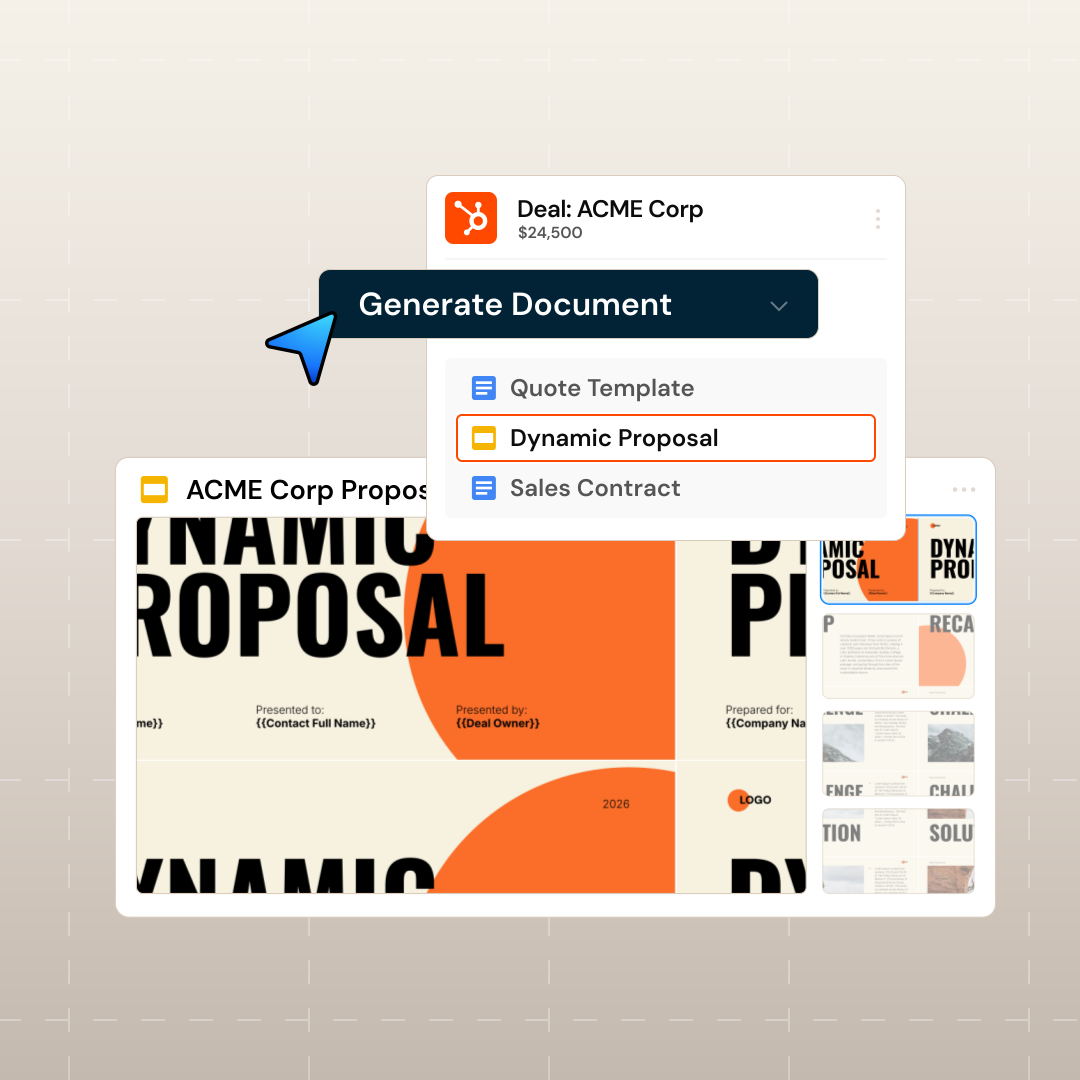
Create any document straight from HubSpot

Generate personalized quotes, contracts and proposals using Google Docs, Slides, Microsoft Word, PowerPoint and PDFs—directly in HubSpot.

Edwin van der Maas

“With Portant, I run documents directly from HubSpot. No jumping between platforms. No copying data.”

Edwin van der Maas · Operations Lead, 2manydots

Generate any document from HubSpot

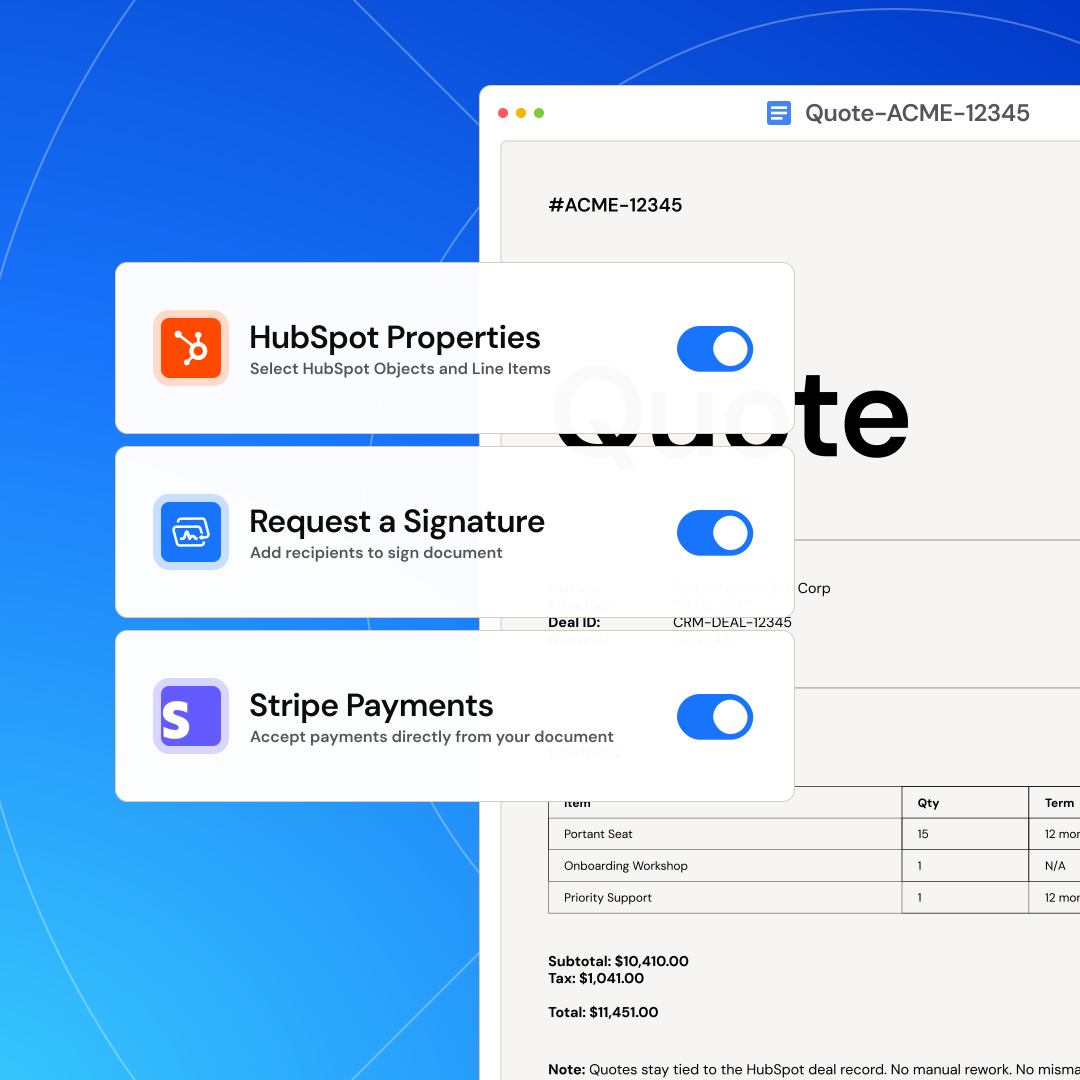
Personalize with HubSpot data, e-signatures & more

Design fully customized documents using any HubSpot data and line items, plus AI content, e-signatures, and Stripe payment links, all aligned with your brand.

Natalie Reeder

“At RepCard, Portant gave us an end-to-end automated workflow inside HubSpot, we replaced manual agreement creation at scale.”

Natalie Reeder · Revenue Operations, RepCard

Personalize with HubSpot data, e-signatures and more

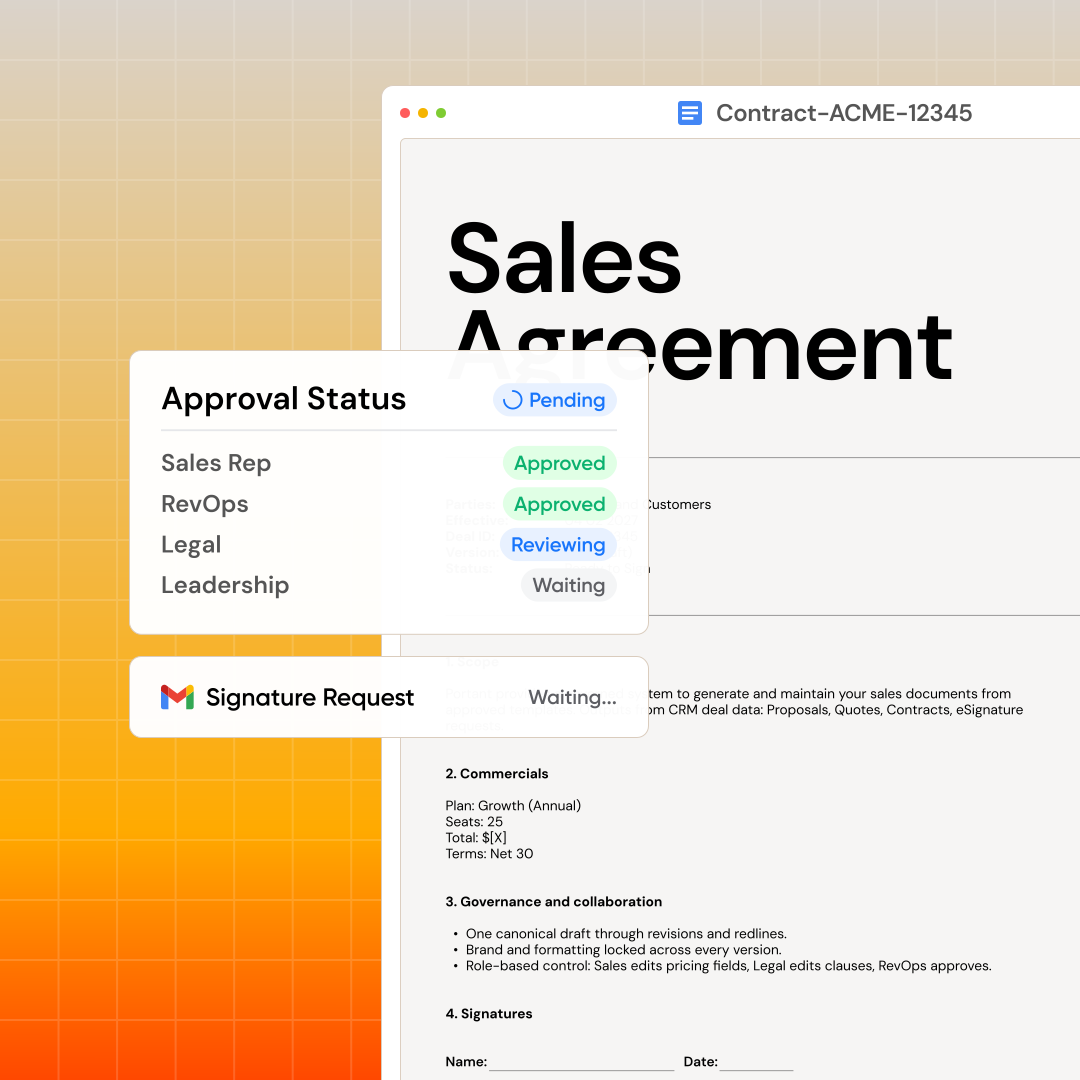
Send, sign, and deliver with built-in approvals

Create workflows that send, sign and save your documents automatically. Add a human in the loop and a review step for approvals and better team collaboration.

Lisa Holmes

“Portant was the simplest and quickest signing integration I’ve ever implemented, it works natively with HubSpot.”

Lisa Holmes · Consultant, Monoceros Services

Send, sign and deliver with approvals

Sync and track everything in HubSpot

Every document gets its own HubSpot record with full status and history. Build reports to track views, status, and signatures in real time. Automatically sync files to Google Drive or OneDrive.

Megan Marohn

“When the executive team asks for an extension document, Portant gets it to them in about an hour, it’s empowered my whole team.”

Megan Marohn · Operations, Boomerang Capital

Sync and track everything in HubSpot

Pricing

Simple, transparent pricing

Prices below are annual billing (same as the default on our pricing page). Open full pricing to switch monthly or compare every feature.

Free

For individuals getting started

$0 /month

30 credits/month · 1 user

Get started
  • Document workflows
  • Template gallery
  • HubSpot integration
  • Single eSignature per doc
  • Chat and email support

Pro

For professionals who need more

$42 /month

billed annually

2,000 credits/month · 1 user

Try for free
  • Everything in Free
  • PDFs without Portant branding
  • Send emails from aliases
  • Auto-trigger from deals
  • Multiple eSignatures per doc
  • Conditional logic & line items
Most popular

Team

For teams sharing workflows

$125 /month

billed annually

5,000 credits/month · 5 users

Try for free
  • Everything in Pro
  • Shared workflows
  • Custom branded eSign portal
  • 5 users included (+$30/user)
  • Team admin panel
  • Approval workflows & priority support

Enterprise

Advanced security and support

Custom

Tailored to your needs

Contact sales
  • Everything in Team
  • Custom credit limits
  • Advanced security
  • Custom billing (PO/ACH/wire)
  • Dedicated account manager

PandaDoc overview

2. PandaDoc

A common next step when HubSpot-only tools feel tight and you want quotes, proposals, and e-signatures in one product, with templates living in PandaDoc’s editor instead of your existing Google or Microsoft files.

Strengths

  • Built-in editor, content library, and signing in one stack with a mature HubSpot integration.
  • Strong when reps want a single doc app for proposals and contracts without touching Word or Docs.

Weaknesses

  • Another template surface: legal and marketing often duplicate work they already keep in Google or Microsoft.
  • Per-user pricing can climb as more teams need seats alongside HubSpot.

Documint overview

3. Documint

A HubSpot Marketplace option when teams want generated PDFs and documents from CRM data using Documint’s own template builder, rather than merging live Google Docs, Word, Slides, or PowerPoint files.

Strengths

  • Built for HubSpot-first merge workflows and repeatable PDF outputs from deals and contacts.
  • Useful when your team is already bought into Documint’s editor and does not need Word or Google as the source of truth.

Weaknesses

  • Google Workspace and Microsoft templates do not stay your live automation surface the way Portant treats them.
  • Plans, credits, and layout limits vary; validate on Documint’s site before you scope a large template catalog.

DocuSign overview

4. DocuSign

The go-to when teams only need signatures and compliance, not a full quote-to-cash document layer inside HubSpot.

Strengths

  • Widely trusted e-signatures and enterprise-grade compliance.
  • Huge integration ecosystem for routing signed files into storage and downstream tools.

Weaknesses

  • HubSpot stays a sync target: you still assemble quotes and proposals elsewhere.
  • Per-user pricing adds up when sales, CS, and ops all need seats.

HubSpot Quotes overview

5. HubSpot Quotes

The built-in option when you want quotes inside HubSpot without another vendor, before you need full templates, approvals, and a document record for every artifact.

Strengths

  • Often already included with your HubSpot subscription.
  • Fast path for simple quotes tied to deals and line items.

Weaknesses

  • Limited compared with full document automation, complex templates, and non-quote assets like decks and contracts.
  • Advanced quote and sign workflows often push teams toward higher Hub tiers or add-ons.

Portant vs ChiliDocs

What’s the best alternative to ChiliDocs?

Feature-by-feature view for HubSpot teams: Documint, PandaDoc, native Quotes, DocuSign, and ChiliDocs (Chili Digital), with Portant on the right.

Documint PandaDoc ChiliDocs HubSpot Quotes DocuSign Portant
Native integrations
Google Workspace
Microsoft 365
HubSpot
Templates store
HubSpot
Saves documents as a record
Syncs across Deals, Contacts & Companies
Generate documents from any property
Document activity log
Use Cases
Dynamic Proposals
Quotes
Contracts
Templates
Google Docs & Word
Google Slides & Powerpoint
PDF templates
Send, Sign + Approvals
Multiple e-signatures
Team approval workflows
Send from Gmail & Outlook
Additional features
HubSpot workflow triggers
Tables & Line items
AI content fields
Team roles
Reporting & Security
HubSpot-native Reports & Dashboards
SOC 2 / HIPAA / ISO certified

FAQs

Which tool fits your team?

Pick the situation closest to yours for a quick recommendation and a link to the full write-up on this page.

Suggestion: Portant. Outputs stay on the deal with your existing Google or Microsoft files, without rebuilding everything in a separate doc builder.

Open the Portant section ยท Pricing

Suggestion: Portant when each artifact should be a first-class HubSpot record with approvals and signing from your existing files. Compare Documint or PandaDoc if you accept another template editor.

Open the Portant section ยท Documint ยท PandaDoc

Suggestion: DocuSign is the usual default. Plan on extra tools if you still need proposals and quotes wired tightly to HubSpot from your own templates.

Open the DocuSign section

Suggestion: HubSpot Quotes until you hit limits on decks, contracts, or complex layouts. Then add a document layer.

Open the HubSpot Quotes section

Suggestion: PandaDoc for a built-in editor, library, and HubSpot-connected quotes and contracts. Expect template work inside PandaDoc rather than Google or Word as the source of truth.

Open the PandaDoc section

Suggestion: Use the comparison table. Portant is the rightmost column.

Open the full comparison table

ChiliDocs (Chili Digital) lists in the HubSpot Marketplace and merges deal, company, and contact data into Word templates you keep in the HubSpot file manager, with a published 14-day trial and Word or PDF output. Portant is built for teams that want Google Docs, Word, Slides, and PowerPoint as live templates, with each document saved as its own HubSpot record across generate, approve, sign, and track.

  • HubSpot-certified; documents and versions stay tied to contacts, companies, and deals.
  • Reuse Google Docs, Word, Slides, and PowerPoint instead of locking templates in a single format.
  • Approvals, signing, and tracking without hopping between tools. See pricing.

Official ChiliDocs overview: chili.ch. Open the Portant section for the deep dive.

Discover why teams switch to Portant.

Real results from Portant customers.

Sam Clarke

Portant saved our sales team countless hours every week automating documents.

Sam Clarke, Co-Founder at Clipboard

Start free
HubSpot 5 stars

3,000+

App installs on the HubSpot Marketplace

G2 5 stars

4.9/5

Average review on G2, an independent review site

Portant

40K+

Teams have switched to Portant

We’re seeing higher average closed revenue with Portant and faster days to close, it’s showing us a material impact on sales velocity.

MB

Matthew B

Founder & Leadership, Upflowy

Join 40,000+ teams

Portant has been a major upgrade for Clipboard! It’s saved our sales team countless hours every week by generating order forms, proposals and contracts with info from HubSpot automatically filled in.

SC

Sam Clarke

Co-Founder, Clipboard

With Portant, I run documents directly from HubSpot. No jumping between platforms. No copying data.

EM

Edwin van der Maas

Operations Lead, 2manydots

Portant replaced three separate tools for us. One platform handles docs, signatures, and follow-ups without leaving HubSpot.

RK

Rachel K

RevOps Manager, Mid-Market

Portant was the simplest and quickest signing integration I’ve ever implemented, it works natively with HubSpot.

LH

Lisa Holmes

Consultant, Monoceros Services

At RepCard, Portant gave us an end-to-end automated workflow inside HubSpot, we replaced manual agreement creation at scale.

NR

Natalie Reeder

Revenue Operations, RepCard

We’re seeing higher average closed revenue with Portant and faster days to close, it’s showing us a material impact on sales velocity.

TP

Tom P

VP Sales, Enterprise SaaS

Love this product. Have been using it for over a year and the integration to Google Workspace is awesome. Lots of credit for listening to your users!

DI

Duncan I

Web, Google & WordPress

When the executive team asks for an extension document, Portant gets it to them in about an hour, it’s empowered my whole team.

MM

Megan Marohn

Operations, Boomerang Capital

Truly a gamechanger! Portant streamlines these tasks and allows me to focus on the things that require my attention and problem-solving!

JH

Jordan H

Administrator, Mid-Market

This software brilliantly takes over the tedious process of creating and sending invoices. This not only saves time but massively reduces errors of data entry.

LG

Lukas G

E-commerce Business Owner

This product is a gamechanger for all of those painful manual document merges. Love what you and the team have built!

MB

Matthew B

Founder & Leadership, Upflowy

Our reps used to spend 30 minutes per proposal. Now it’s under two minutes and the documents look better than ever.

JS

James S

Sales Director, Agency

Stop formatting,
start closing.

Start your 7 day free trial

Join over 40,000 sales teams using Portant to close deals faster in HubSpot.